

Custom Posts
我们使用 customPost 和 customPosts 字段来获取 CPT 数据,无论是已映射到模式的 CPT(如 Post 和 Page),还是尚未映射的 CPT(如某个插件的 CPT)。由于结果可能包含不同类型的实体,这些字段返回 CustomPostUnion 类型。
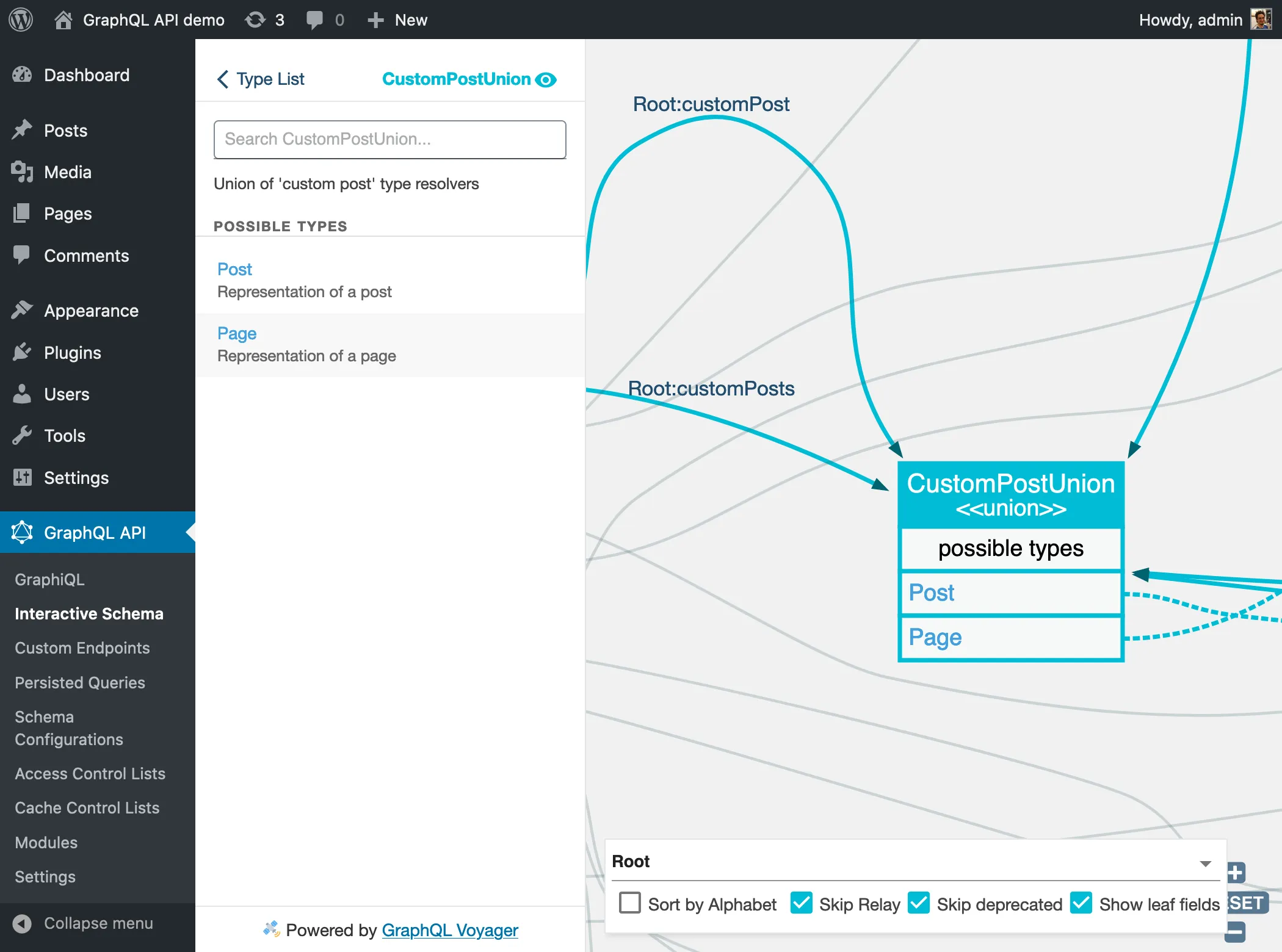
模式中的 Custom Post 字段
Gato GraphQL 明确区分了自定义文章是"自定义文章"还是直接的"文章"。
例如,评论可以添加到文章,也可以添加到页面和 CPT,因此 Comment 类型使用字段 customPost: CustomPostUnion! 来获取评论所属的实体,而不是字段 post: Post!。
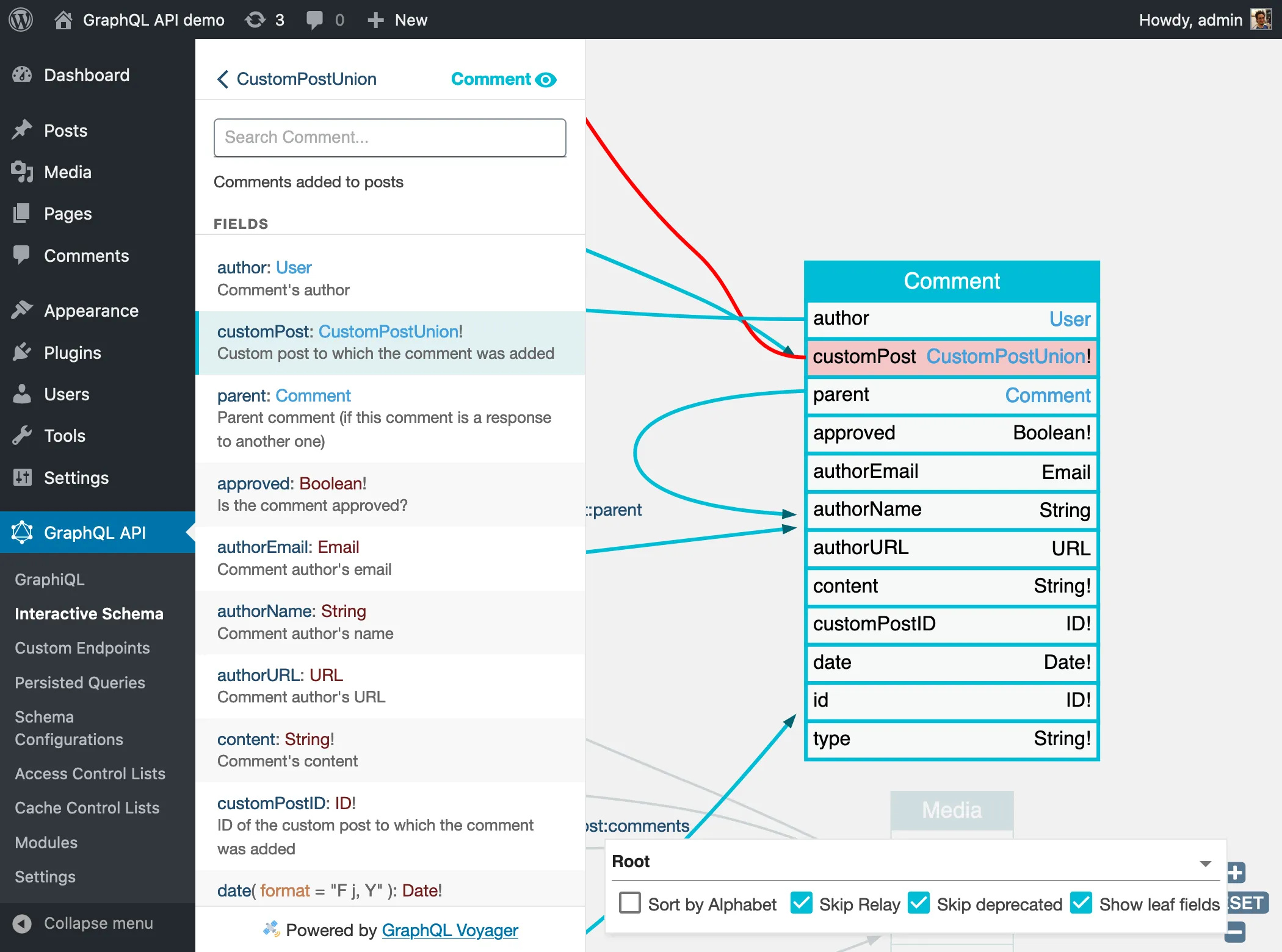
这也是为什么字段 customPosts 接收的参数是 customPostTypes 而不是 postTypes。
已映射到模式的 CPT
有些 CPT 已经映射到模式中(例如用于表示 CPT "post" 和 "page" 的 Post 和 Page)。在这种情况下,查询将使用该 CPT 对应的 GraphQL 类型进行解析。
从联合类型获取结果时,需要通过 fragment 指定要获取的字段。这些 fragment 可以对所有 CPT 类型都实现的接口 CustomPost 进行求值,也可以对 Post 或 Page 等各个具体类型进行求值。
在以下 Query 中,我们获取 CPT 为 "post" 和 "page" 的自定义文章。通过 3 个 fragment 展示字段,分别评估实体是否实现了 CustomPost,以及是否为 Post 或 Page 类型:
query {
customPosts(filter: { customPostTypes: ["post", "page"] }) {
...CustomPostProps
...PostProps
...PageProps
}
}
fragment CustomPostProps on CustomPost {
__typename
title
excerpt
url
dateStr(format: "d/m/Y")
}
fragment PostProps on Post {
tags {
id
name
}
}
fragment PageProps on Page {
author {
id
name
}
}未映射到模式的 CPT
当 CPT 尚未映射到模式时(如 "attachment"、"revision"、"nav_menu_item",或任何插件安装的 CPT),仍然使用 customPost 和 customPosts 字段,并且必须在字段参数 filter.customPostTypes 中传入对应的 CPT 名称。
由于这些类型不存在于模式中,数据将通过类型 GenericCustomPost 获取,该类型包含所有 CPT 共有的属性(title、content、excerpt、date 等)。
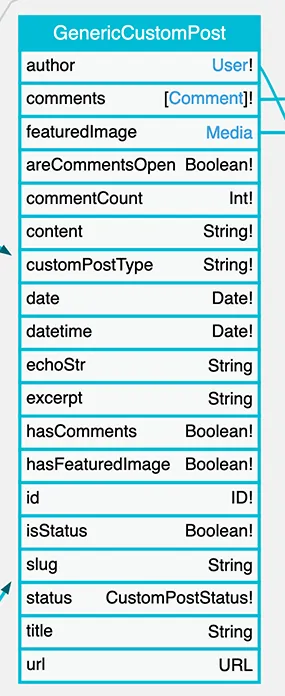
以下 Query 获取多种 CPT 的自定义文章:
query {
customPosts(
filter:{
customPostTypes: [
"page",
"nav_menu_item",
"wp_block",
"wp_global_styles"
]
}
) {
... on CustomPost {
id
title
customPostType
status
}
__typename
}
}允许访问 Custom Post Types
CPT 必须被明确允许才能进行查询,详情请参阅指南 允许访问 Custom Post Types。
查询自定义文章
已映射到模式的 CPT 的 GraphQL 类型(如 "post" => Post,"page" => Page)将直接并入 CustomPostUnion。
对于未在模式中建模的 CPT(如 "attachment"、"revision"、"nav_menu_item",或任何插件安装的 CPT),其数据将通过 GenericCustomPost 类型访问。
我们通过字段参数 filter.customPostTypes 指定要获取的 CPT,该参数接收一个字符串列表,包含 WordPress 中定义的 CPT 名称(如 "post"、"page" 等)。例如:
query {
customPosts(
filter: { customPostTypes: ["some-custom-cpt"] }
) {
... on CustomPost {
id
title
}
}
}以下 Query 从多个 CPT 中获取条目:
query {
customPosts(
filter: {
customPostTypes: [
"post",
"page",
"attachment",
"nav_menu_item",
"custom_css",
"revision"
],
status: [
publish,
inherit,
auto_draft
]
}
) {
id
title
content
status
customPostType
__typename
}
}由于所有 Custom Post 都实现了接口 CustomPost,我们可以通过 fragment 引用或内联 fragment 从 CustomPostUnion 中获取数据:
query {
comments {
id
date
content
customPost {
__typename
...on CustomPost {
id
title
url
}
}
}
}如果我们知道评论是添加到某篇文章上的,还可以查询 Post 特有的字段:
query {
comments {
id
date
content
customPost {
__typename
...on CustomPost {
id
title
url
}
...on Post {
categoryNames
}
}
}
}按自定义分类法筛选 CPT
自定义文章类型可以关联自定义分类法(标签和分类目录)。例如,CPT "product" 可能关联了分类目录分类法 "product-cat" 和标签分类法 "product-tag"。
我们可以通过 filter 输入中的 tags 和 categories 输入,按这些关联的分类法筛选结果。
以下 Query 按分类目录筛选并获取自定义文章:
query {
customPosts(
filter: {
categories: {
includeBy: {
ids: [26, 28]
}
taxonomy: "product-cat"
}
}
) {
... on CustomPost {
id
title
}
... on GenericCustomPost {
categories(taxonomy: "product-cat") {
id
}
}
}
}获取自定义 CPT 数据
使用 GenericCustomPost 时,只能请求所有 CPT 共有的字段;不支持获取某个 CPT 的自定义数据(例如获取自定义 CPT "product" 的价格数据)。
要获取自定义 CPT 数据,需要在 PHP 代码中创建对应的解析器,将 CPT 映射到模式:
- 创建
Product类型 - 为其附加
price字段
此后,CustomPostUnion 类型(由 Root.customPosts 返回)将把该 CPT 的所有条目解析为 Product 类型。
query {
customPosts(
filter: {
customPostTypes: "product"
}
) {
__typename
...on CustomPost { # interface implemented by all CPT types
id
title
customPostType
status
}
...on Product { # custom CPT type
price # custom field
}
}
}我们还可以额外创建字段 Root.products: [Product!],并直接使用:
query {
products {
__typename # Product
id
title
status
price # custom field
}
}对自定义 CPT 数据进行 Mutation
对于不需要在 Post 类型字段之外添加额外字段的 CPT,可以自由使用 createCustomPost 和 updateCustomPost mutation。
例如,使用标准字段 title 和 content、没有额外字段的 MyPortfolio CPT,可以完全通过这些 mutation 进行管理。
以下 Query 为 "my-portfolio" CPT 创建一个条目:
mutation {
createCustomPost(
input: {
customPostType: "my-portfolio"
title: "My photograph"
contentAs: { html: "This is my photo, check it out." }
}
) {
status
errors {
__typename
...on ErrorPayload {
message
}
...on GenericErrorPayload {
code
}
}
customPost {
__typename
...on CustomPost {
id
title
content
}
}
}
}以下 Query 更新同一 CPT 的标题和内容:
mutation {
updateCustomPost(input: {
id: 1
customPostType: "my-portfolio"
title: "Updated title"
contentAs: { html: "Updated content" }
}) {
status
errors {
__typename
...on ErrorPayload {
message
}
}
customPost {
__typename
...on CustomPost {
id
title
content
}
}
}
}由第三方插件提供的自定义文章类型,可能只能由对应的插件来创建(也可能包括更新)。
这是因为它们可能在 wp_postmeta 或专有表中存有自定义数据,这些数据也需要一并添加,而 Gato GraphQL 对此并不了解。
要妥善管理这些 CPT,必须在该插件与 Gato GraphQL 之间创建对应的集成,以提供 CPT 所有字段的映射。
例如,我们可以使用字段 Root.updateCustomPost 来翻译和更新 WooCommerce 商品(即 Product CPT)的标题和内容。但是,我们无法创建 WooCommerce 商品;为此,必须使用对应的「WooCommerce for Gato GraphQL」扩展。