

自动化任务
当站点发生某些事件时,自动执行 GraphQL Persisted Query。
直接通过 WordPress 编辑器创建自动化流程。自动化触发器是任意 WordPress 动作钩子,动作是执行 GraphQL Persisted Query。
访问所有自动化规则
在插件菜单中点击「Automation Rules」,将显示所有已创建的自动化规则列表:
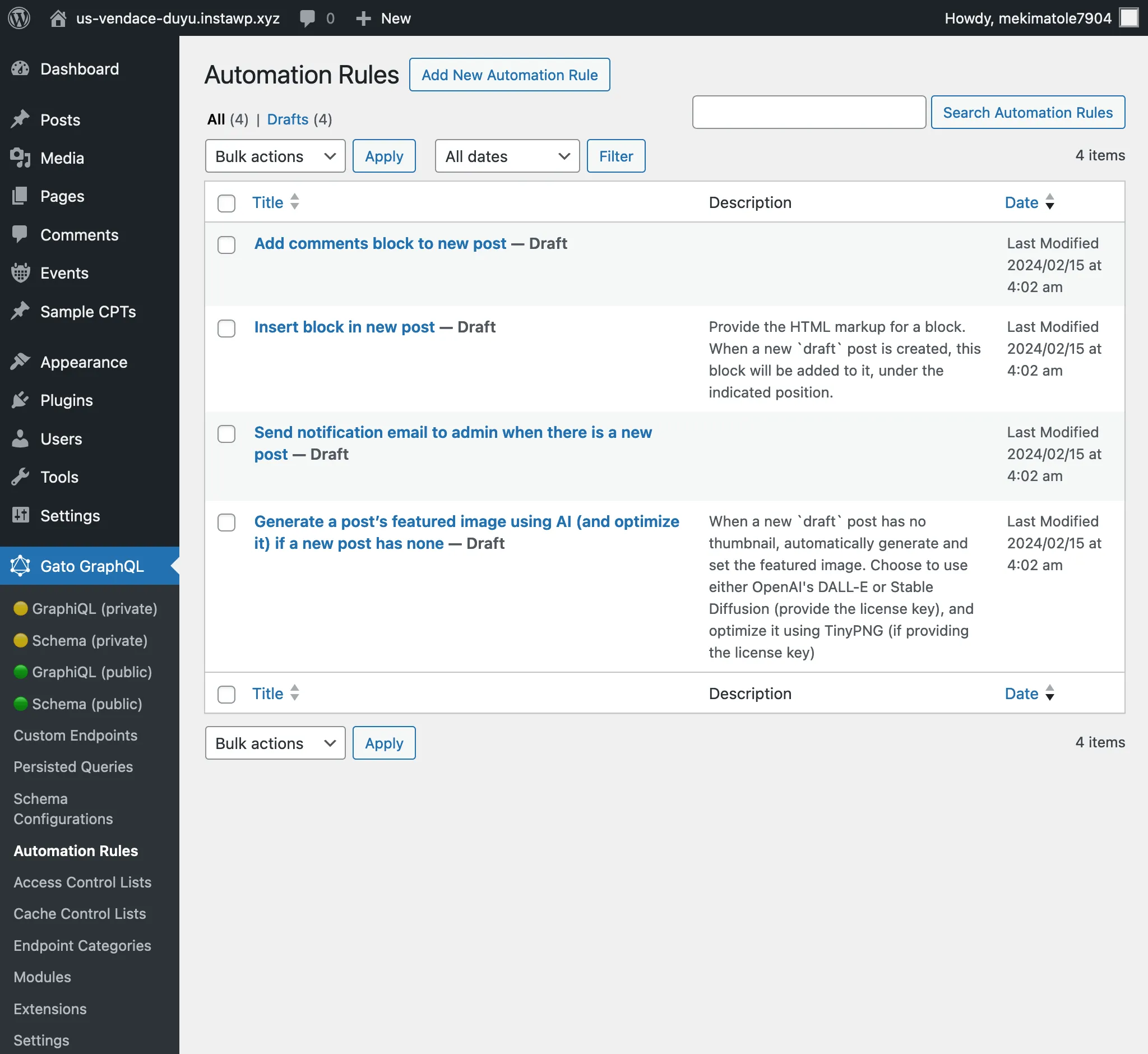
创建新的自动化规则
点击「Add New Automation Rule」以添加新条目。
在编辑器界面中,需要配置以下内容:
- 自动化触发器
- 自动化动作
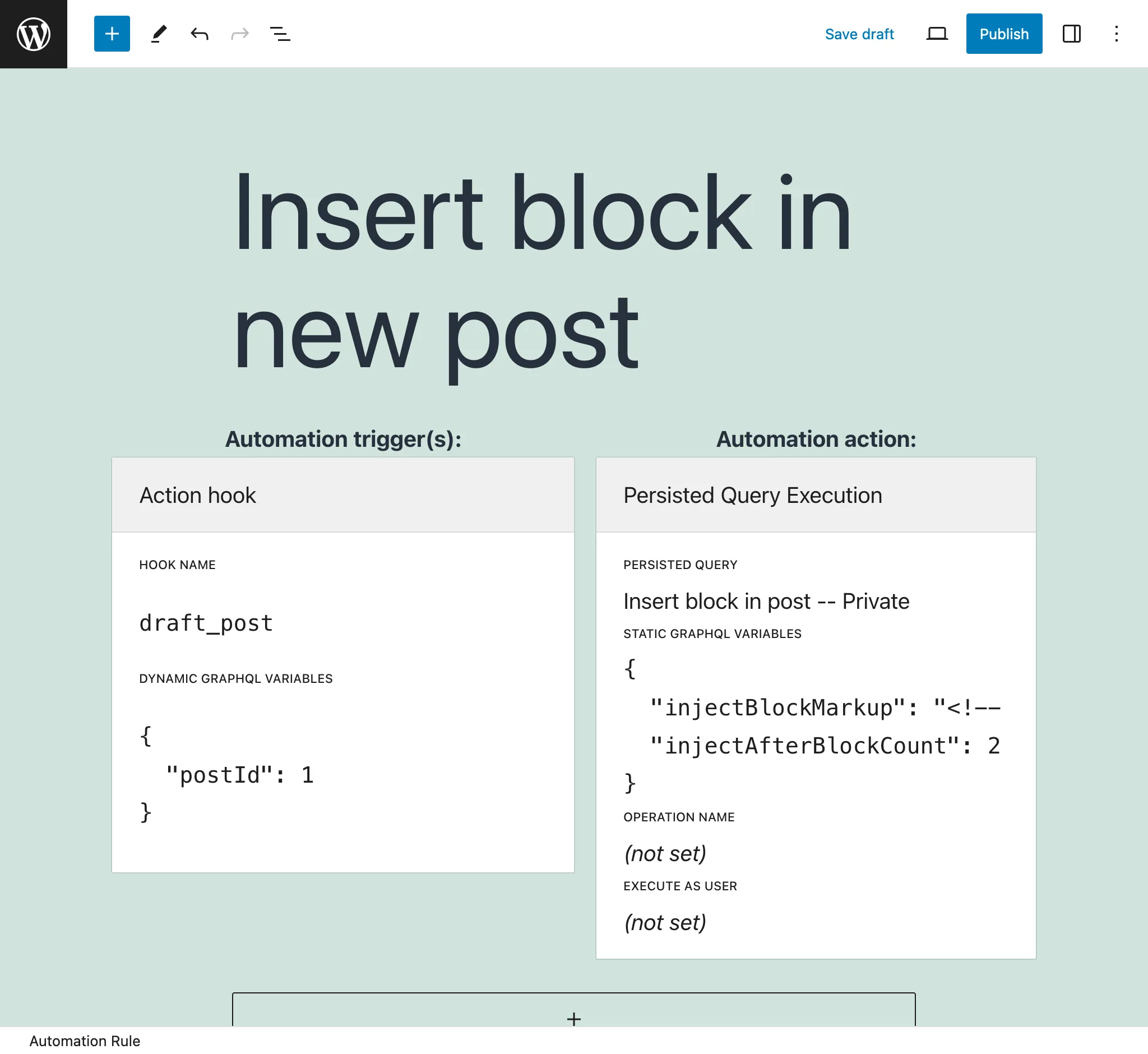
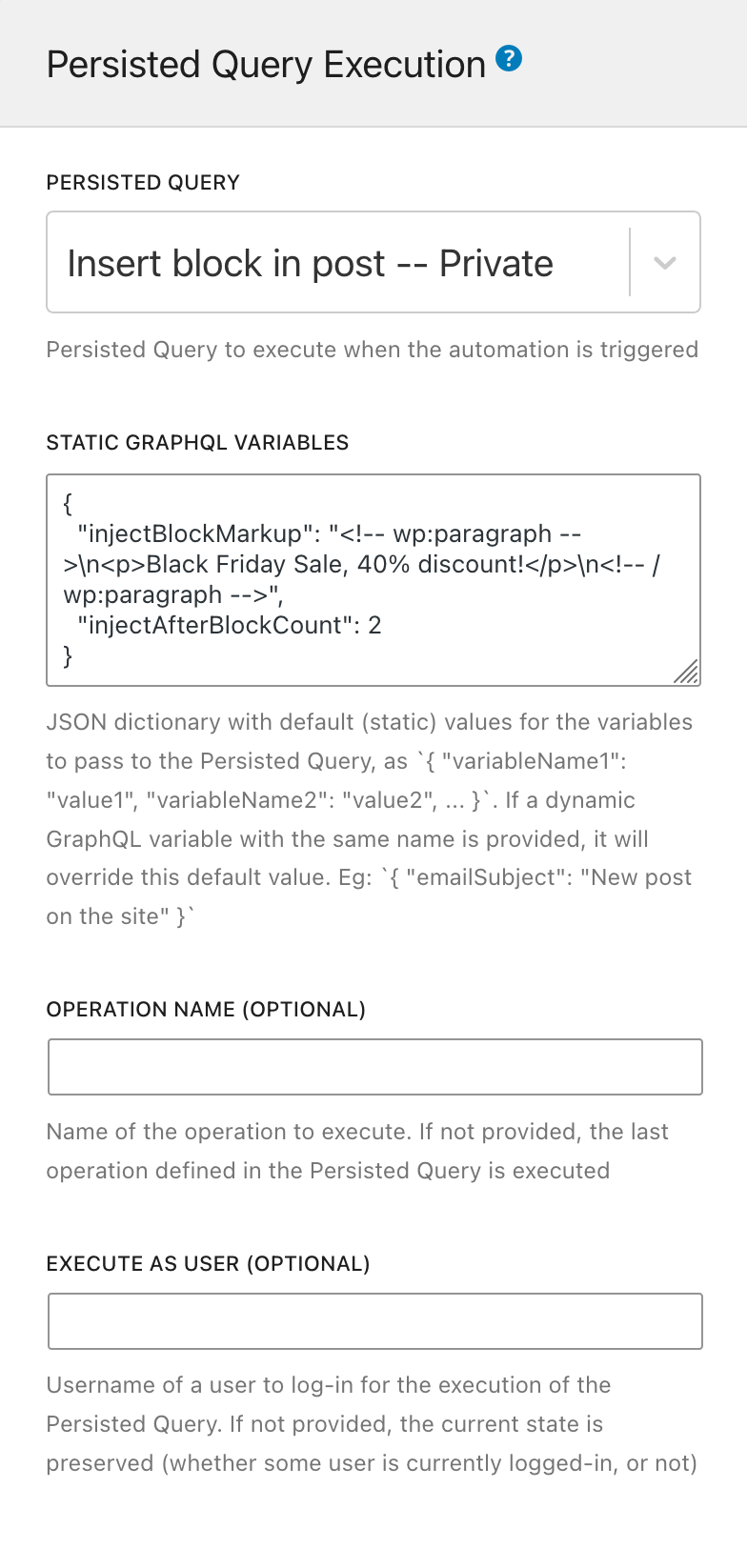
自动化动作
自动化动作指定将执行哪个 GraphQL Persisted Query。
使用以下元素配置此项:
Persisted Query:选择要执行的 GraphQL Persisted Query(从所有状态为 publish 或 private 的条目中选择)
Static GraphQL Variables:提供一个 JSON 字符串,为 Persisted Query 中的 GraphQL 变量赋值。这些是静态值。
例如:
{
"emailSubject": "New post on the site"
}这些值会被「动态」GraphQL 变量覆盖(请参见下方的自动化触发器)。
Operation name(可选):如果 Persisted Query 包含多个操作,可以指定要执行哪个操作(默认执行最后一个)。
Execute as user(可选):提供用户 slug,以特定用户的登录状态执行 GraphQL Persisted Query。
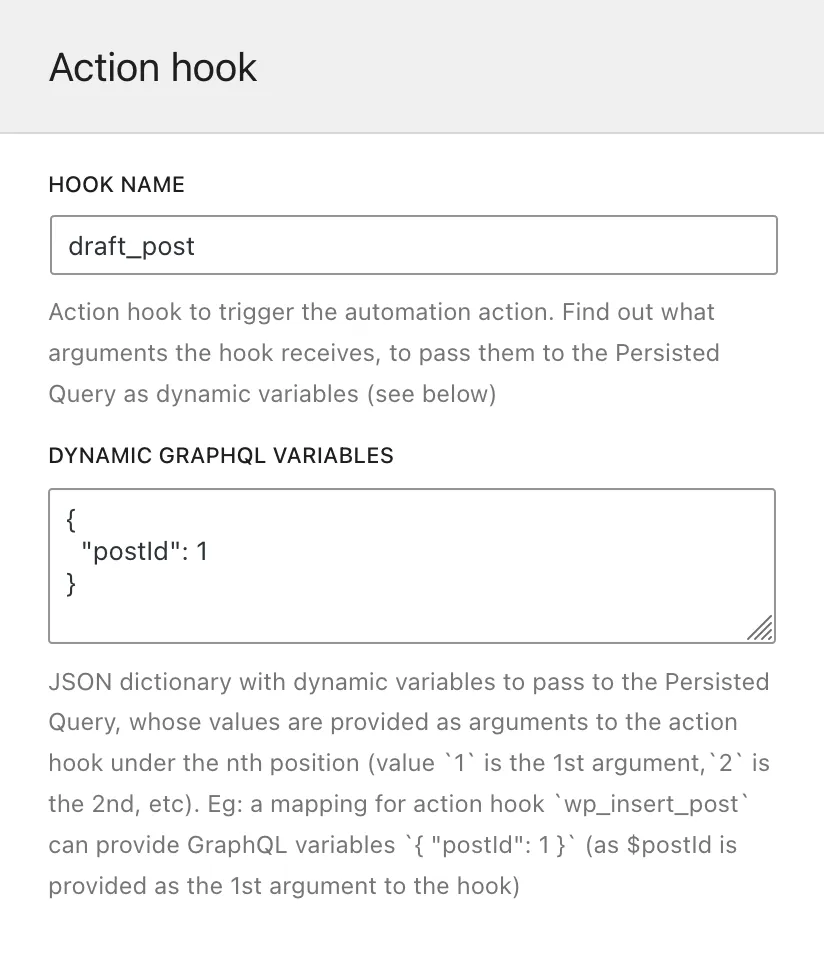
自动化触发器
自动化触发器指定哪个 WordPress 动作钩子将触发 Persisted Query 的执行。可以提供多个触发器(例如:若只需对编辑文章或页面做出响应,可以提供钩子 edit_post_post 和 edit_post_page)。
使用以下元素配置此项:
Hook name:WordPress 动作钩子名称。
Dynamic GraphQL Variables:提供一个 JSON 字符串,将 GraphQL 变量映射到传入钩子函数的参数。这些动态值将在运行时提供给 Query。
JSON 字典必须以 GraphQL 变量名为键,以动作钩子中参数的位置为值。
例如,钩子 draft_post(来自 post status transitions)将 $post_id 作为第一个参数传入。以下 JSON 表示 GraphQL 变量 $postID 将接收传递给钩子的 $post_id 的值:
{
"postID": 1
}(在此示例中,1 表示「draft_post 第1个参数的值」。)
如果「动态」和「静态」GraphQL 变量(请参见上方的自动化动作)使用了相同的键,则动态值优先。
WordPress 钩子映射
有些 WordPress 钩子无法直接在 Automation Configurator 中使用,因为这些钩子通过钩子传递了 PHP 对象,无法作为 GraphQL 变量输入。
Gato GraphQL 已对这些钩子中的若干个进行了映射:通过触发一个以 gatographql: 为前缀、同名的新钩子,并将对应的对象 ID 作为变量传入,从而可以作为 GraphQL 变量使用。
例如,WordPress 钩子 draft_to_publish 传递变量 $post(类型为 WP_Post)。Gato GraphQL 将此钩子映射为 gatographql:draft_to_publish,并传递变量 $postId(类型为 int)。
下表列出了已映射的 WordPress 钩子:
| WordPress 钩子 | Gato GraphQL 映射后的钩子 |
|---|---|
{$old_status}_to_{$new_status}(传递 WP_Post $post) | gatographql:{$old_status}_to_{$new_status}(传递 int $postId, string $postType) |
此外,Gato GraphQL 还会在钩子名称中附加额外信息后重新触发若干 WordPress 钩子,以便更方便地捕获并自动化特定事件。
例如,创建、更新和删除元值的钩子在触发时会将元键包含在钩子名称中。这样,当文章被设置特色图片时,可以通过钩子 gatographql:added_post_meta:_thumbnail_id 触发自动化。
以下是 Gato GraphQL 的附加钩子:
| 源 WordPress 钩子 | 触发的 Gato GraphQL 钩子 |
|---|---|
{$old_status}_to_{$new_status}(传递 WP_Post $post) | gatographql:any_to_{$new_status}gatographql:{$old_status}_to_anygatographql:{$old_status}_to_{$new_status}:{$post_type}gatographql:any_to_{$new_status}:{$post_type}gatographql:{$old_status}_to_any:{$post_type}(均传递 int $postId, string $postType) |
created_term | gatographql:created_term:{$taxonomy} |
set_object_terms | gatographql:set_object_terms:{$taxonomy}gatographql:updated_object_terms:{$taxonomy} (当新旧 term 存在差异时) |
added_post_meta | gatographql:added_post_meta:{$meta_key}gatographql:added_post_meta:{$post_type}:{$meta_key} (同时将 string $post_type 作为第5个参数传递) |
updated_post_meta | gatographql:updated_post_meta:{$meta_key}gatographql:updated_post_meta:{$post_type}:{$meta_key} (同时将 string $post_type 作为第5个参数传递) |
deleted_post_meta | gatographql:deleted_post_meta:{$meta_key}gatographql:deleted_post_meta:{$post_type}:{$meta_key} (同时将 string $post_type 作为第5个参数传递) |
added_term_meta | gatographql:added_term_meta:{$meta_key}gatographql:added_term_meta:{$taxonomy}:{$meta_key} (同时将 string $taxonomy 作为第5个参数传递) |
updated_term_meta | gatographql:updated_term_meta:{$meta_key}gatographql:updated_term_meta:{$taxonomy}:{$meta_key} (同时将 string $taxonomy 作为第5个参数传递) |
deleted_term_meta | gatographql:deleted_term_meta:{$meta_key}gatographql:deleted_term_meta:{$taxonomy}:{$meta_key} (同时将 string $taxonomy 作为第5个参数传递) |
调试问题
如果自动化未被执行,可能是自动化配置或 Persisted Query 执行存在错误。
执行日志
详情请参见排查问题。
错误日志
所有配置问题(例如 GraphQL 变量的 JSON 字符串格式错误,或引用了已删除的 Persisted Query)以及执行错误(例如抛出的异常,或 GraphQL Query 中的 errors 条目)都会发送至 PHP 的 error_log 函数,并输出到 WordPress 错误日志中。
这些错误日志的开头会附加字符串 [Gato GraphQL]。