

处理 mutation payload
Mutation 字段可以配置为返回以下两种不同的实体类型之一:
- Payload 对象类型
- 直接返回被修改的实体
Payload 对象类型
Payload 对象类型包含与 mutation 相关的所有数据:
- Mutation 的状态(成功或失败)
- 错误信息(如有),使用独特的 GraphQL 类型表示,或
- 成功修改后的实体
例如,mutation updatePost 返回类型为 PostUpdateMutationPayload 的对象,我们还需要查询其字段 post 来获取更新后的文章实体:
mutation UpdatePost {
updatePost(input: {
id: 1724,
title: "New title",
status: publish
}) {
# This is the status of the mutation: SUCCESS or FAILURE
status
errors {
__typename
...on ErrorPayload {
message
}
}
post {
id
title
# This is the status of the post: publish, pending, trash, etc
status
}
}
}使用 payload 对象能让我们更好地表示错误,甚至可以为每种错误类型定义唯一的 GraphQL 类型。这使应用程序能够针对不同错误呈现不同的响应,从而改善用户体验。
在上述示例中,如果操作成功,将收到:
{
"data": {
"updatePost": {
"status": "SUCCESS",
"errors": null,
"post": {
"id": 1724,
"title": "Some title",
"status": "publish"
}
}
}
}如果用户未登录,将收到:
{
"data": {
"updatePost": {
"status": "FAILURE",
"errors": [
{
"__typename": "UserIsNotLoggedInErrorPayload",
"message": "You must be logged in to create or update custom posts"
}
],
"post": null
}
}
}如果用户没有编辑文章的权限,将收到:
{
"data": {
"updatePost": {
"status": "FAILURE",
"errors": [
{
"__typename": "LoggedInUserHasNoEditingCustomPostCapabilityErrorPayload",
"message": "Your user doesn't have permission for editing custom posts."
}
],
"post": null
}
}
}在此模式下,GraphQL schema 将包含大量额外的 MutationPayload、MutationErrorPayloadUnion 和 ErrorPayload 类型,因此 schema 体积会更大:
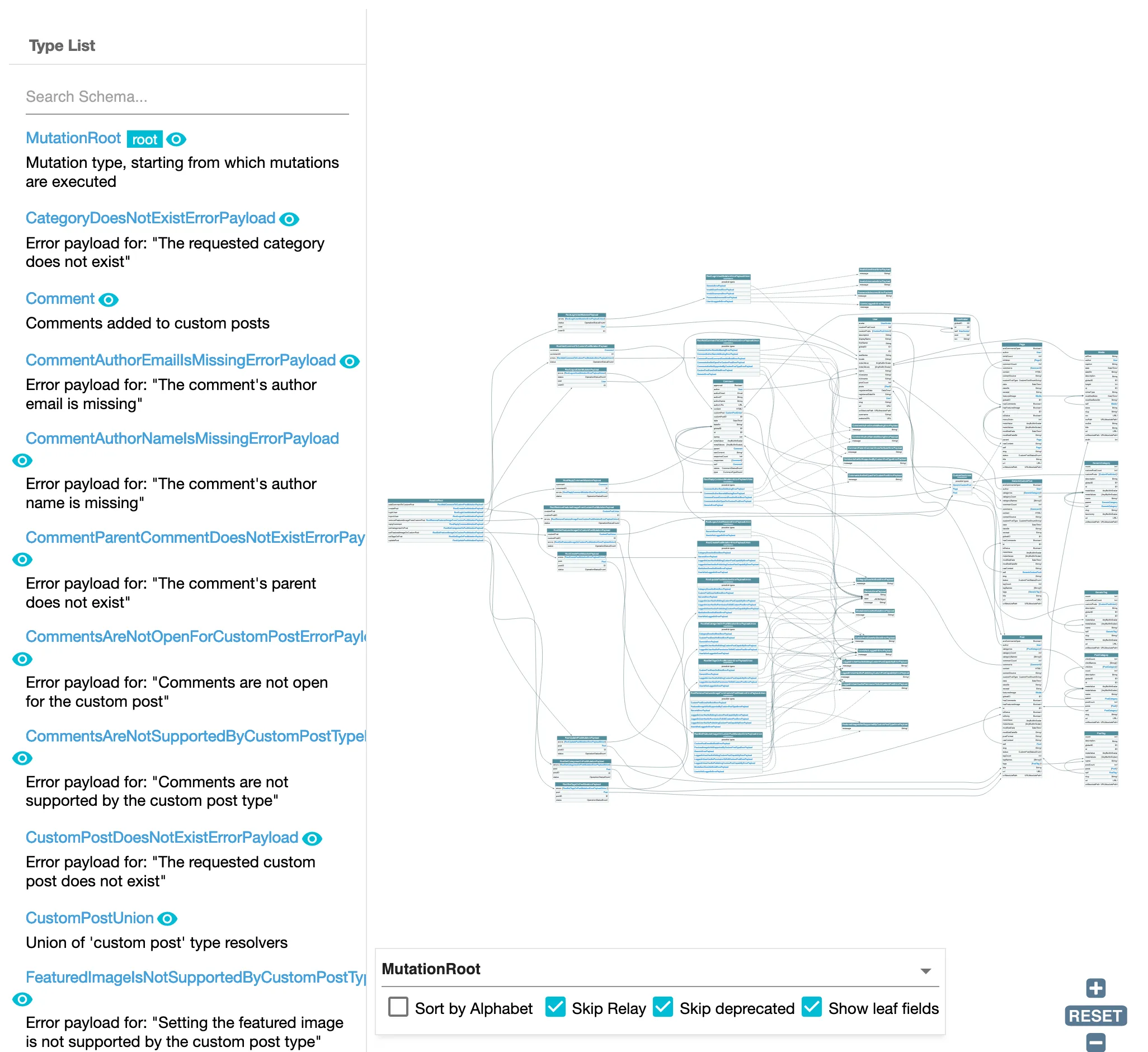
查询 mutation payload 对象
Schema 中的每个 mutation 都有一个对应字段,用于查询其最近创建的 payload 对象,命名格式为 {mutationName}MutationPayloadObjects。
这些字段包括:
addCommentToCustomPostMutationPayloadObjects(对应addCommentToCustomPost)createCustomPostMutationPayloadObjects(对应createCustomPost)createMediaItemMutationPayloadObjects(对应createMediaItem)createPageMutationPayloadObjects(对应createPage)createPostMutationPayloadObjects(对应createPost)removeFeaturedImageFromCustomPostMutationPayloadObjects(对应removeFeaturedImageFromCustomPost)replyCommentMutationPayloadObjects(对应replyComment)setCategoriesOnPostMutationPayloadObjects(对应setCategoriesOnPost)setFeaturedImageOnCustomPostMutationPayloadObjects(对应setFeaturedImageOnCustomPost)setTagsOnPostMutationPayloadObjects(对应setTagsOnPost)updateCustomPostMutationPayloadObjects(对应updateCustomPost)updatePageMutationPayloadObjects(对应updatePage)updatePostMutationPayloadObjects(对应updatePost)
这些字段使我们能够在遍历数组中的条目时,检索通过 @applyField 执行的 mutation 结果。
例如,以下 query 可批量复制文章:
query GetPostsAndExportData
{
postsToDuplicate: posts {
title
rawContent
excerpt
# Already create (and export) the inputs for the mutation
postInput: _echo(value: {
title: $__title
contentAs: {
html: $__rawContent
},
excerpt: $__excerpt
})
@export(as: "postInput", type: LIST)
@remove
}
}
mutation CreatePosts
@depends(on: "GetPostsAndExportData")
{
createdPostMutationPayloadObjectIDs: _echo(value: $postInput)
@underEachArrayItem(
passValueOnwardsAs: "input"
)
@applyField(
name: "createPost"
arguments: {
input: $input
},
setResultInResponse: true
)
@export(as: "createdPostMutationPayloadObjectIDs")
}
query DuplicatePosts
@depends(on: "CreatePosts")
{
createdPostMutationObjectPayloads: createPostMutationPayloadObjects(input: {
ids: $createdPostMutationPayloadObjectIDs
}) {
status
errors {
__typename
...on ErrorPayload {
message
}
}
post {
id
title
rawContent
excerpt
}
}
}默认情况下,这些字段不会添加到 GraphQL schema 中。要添加它们,必须选择"Use payload types for mutations, and add fields to query those payload objects"选项。
被修改的实体
Mutation 在成功时将直接返回被修改的实体,失败时返回 null,任何错误消息将显示在 JSON 响应顶层的 errors 条目中。
例如,mutation updatePost 将返回类型为 Post 的对象:
mutation UpdatePost {
updatePost(input: {
id: 1724,
title: "New title",
status: publish
}) {
id
title
status
}
}如果操作成功,将收到:
{
"data": {
"updatePost": {
"id": 1724,
"title": "Some title",
"status": "publish"
}
}
}如果发生错误,这些错误将出现在响应的 errors 条目下。例如,如果用户未登录,将收到:
{
"errors": [
{
"message": "You must be logged in to create or update custom posts'",
"locations": [
{
"line": 2,
"column": 3
}
]
}
],
"data": {
"updatePost": null
}
}需要注意的是,顶层 errors 条目将不仅包含语法错误、schema 验证错误和逻辑错误(例如:未传入字段参数名称、请求不存在的字段,或在网络断开时调用 _sendHTTPRequest),还会包含"内容验证"错误(例如:"您无权修改此文章")。
由于没有添加额外类型,GraphQL schema 将显得更加精简:
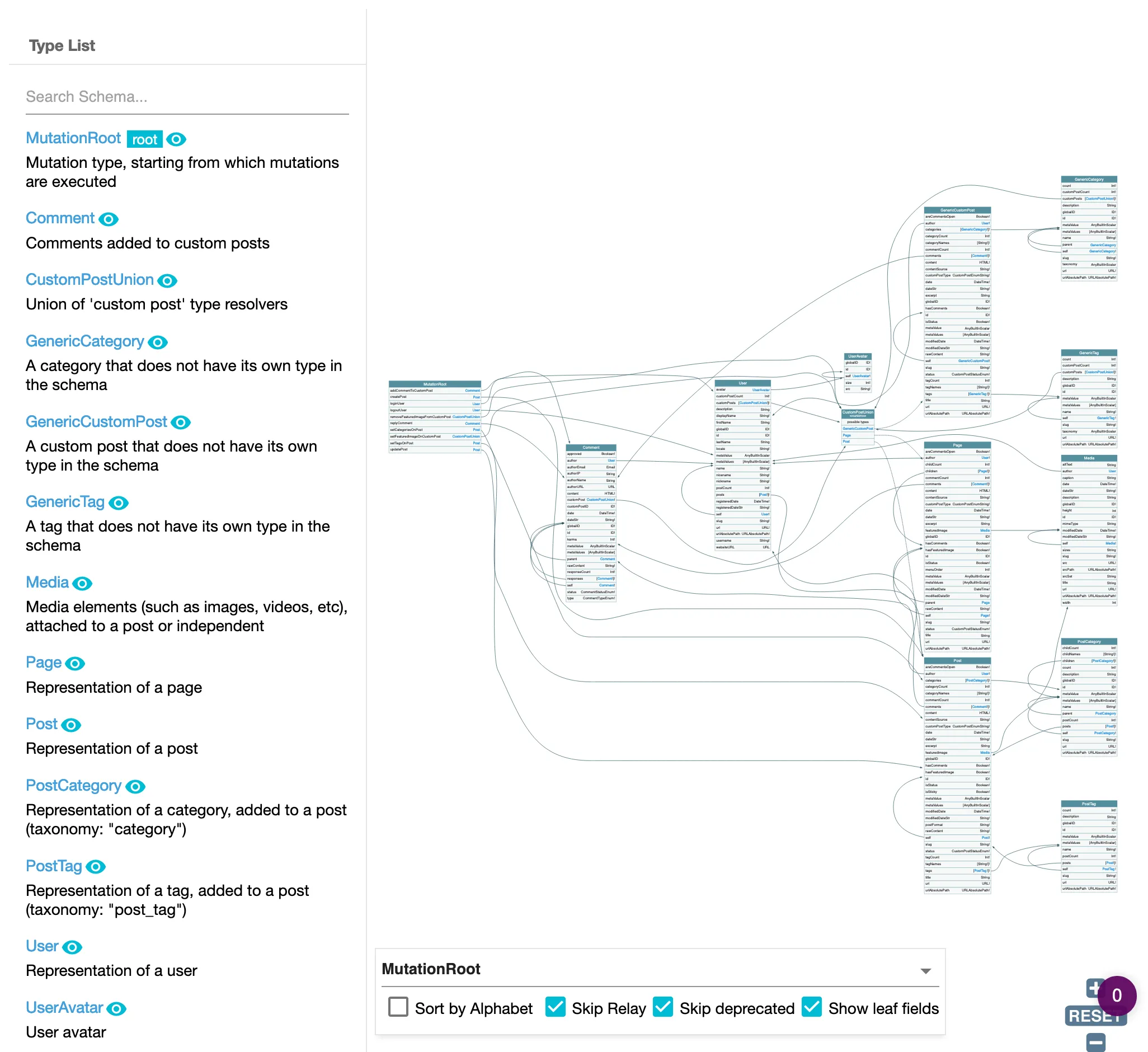
处理 mutation 的 payload 对象类型
让我们来了解如何处理第一个选项——payload 对象类型。
Schema 中的 mutation 会返回某个 payload 对象,该对象提供 mutation 产生的错误,或在成功时提供修改后的对象(这两个属性通常是互斥的:errors 或 object 中的一个会有值,另一个为 null)。
错误通过某种"ErrorPayloadUnion"类型提供,该类型包含该 mutation 所有可能的错误。每种可能的错误都是实现了 ErrorPayload 接口的某种"ErrorPayload"类型。
例如,操作 updatePost 返回 PostUpdateMutationPayload,包含以下字段:
status:表示操作是否成功,值为SUCCESS或FAILUREpost和postID:更新成功时返回的已更新文章对象及其 IDerrors:更新失败时返回的CustomPostUpdateMutationErrorPayloadUnion列表
联合类型 CustomPostUpdateMutationErrorPayloadUnion 包含修改自定义文章时可能发生的所有错误列表:
CustomPostDoesNotExistErrorPayloadGenericErrorPayloadLoggedInUserHasNoEditingCustomPostCapabilityErrorPayloadLoggedInUserHasNoPermissionToEditCustomPostErrorPayloadLoggedInUserHasNoPublishingCustomPostCapabilityErrorPayloadUserIsNotLoggedInErrorPayload
错误类型 GenericErrorPayload 包含在所有"ErrorPayloadUnion"类型中。当无法指出错误的具体原因时使用,例如 wp_update_post 仅产生 WP_Error 的情况。该类型提供两个额外字段:code 和 data。
要执行 updatePost mutation,可以运行:
mutation UpdatePost(
$postId: ID!
$title: String!
) {
updatePost(
input: {
id: $postId,
title: $title,
}
) {
status
errors {
__typename
...on ErrorPayload {
message
}
...on GenericErrorPayload {
code
}
}
post {
id
title
}
}
}如果操作成功,将收到:
{
"data": {
"updatePost": {
"status": "SUCCESS",
"errors": null,
"post": {
"id": 1724,
"title": "This incredible title"
}
}
}
}如果用户未登录,将收到:
{
"data": {
"updatePost": {
"status": "FAILURE",
"errors": [
{
"__typename": "UserIsNotLoggedInErrorPayload",
"message": "You must be logged in to create or update custom posts"
}
],
"post": null
}
}
}如果用户没有编辑文章的权限,将收到:
{
"data": {
"updatePost": {
"status": "FAILURE",
"errors": [
{
"__typename": "LoggedInUserHasNoEditingCustomPostCapabilityErrorPayload",
"message": "Your user doesn't have permission for editing custom posts."
}
],
"post": null
}
}
}