

Email Sender
通过全局 mutation _sendEmail 发送电子邮件。
说明
mutation _sendEmail 通过执行 WordPress 的 wp_mail 函数来发送电子邮件。因此,它将使用 WordPress 中配置的邮件发送设置(例如所使用的 SMTP 提供商)。
电子邮件可以根据 messageAs 输入的值以「text」或「HTML」内容类型发送(messageAs 是一个「oneof」InputObject,因此其属性中只能提供一个)。
要以文本形式发送,请提供属性 messageAs.text:
mutation {
_sendEmail(
input: {
to: "target@email.com"
subject: "Email with text content"
messageAs: {
text: "Hello world!"
}
}
) {
status
errors {
__typename
...on ErrorPayload {
message
}
}
}
}要以 HTML 形式发送,请提供属性 messageAs.html:
mutation {
_sendEmail(
input: {
to: "target@email.com"
subject: "Email with HTML content"
messageAs: {
html: "<p>Hello world!</p>"
}
}
) {
status
errors {
__typename
...on ErrorPayload {
message
}
}
}
}全局字段
_sendEmail 是一个全局字段(更准确地说,是一个全局 mutation)。这意味着,如果启用了 Nested Mutations,此 mutation 可以在 GraphQL schema 的任意类型上执行(即不仅限于 MutationRoot)。
这在遍历用户列表并向每个用户发送电子邮件时非常有用(在这种情况下,mutation 在 User 类型中触发):
mutation {
users {
email
_sendEmail(
input: {
to: $__email
subject: "..."
messageAs: {
text: "..."
}
}
) {
status
errors {
__typename
...on ErrorPayload {
message
}
}
}
}结合其他扩展的功能(在本例中为 Field to Input 和 PHP Functions via Schema),我们可以为每个用户创建个性化消息:
mutation {
users {
email
displayName
remainingCredits: metaValue(key: "credits")
emailMessage: _sprintf(
string: """
<p>Hello %s!</p>
<p>Your have <strong>%s remaining credits</strong> in your account.</p>
<p><a href="%s">Buy more?</a></p>
""",
values: [
$__displayName,
$__remainingCredits,
"https://mysite.com/buy-credits"
]
)
_sendEmail(
input: {
to: $__email
subject: "Remaining credits"
messageAs: {
html: $__emailMessage
}
}
) {
status
errors {
__typename
...on ErrorPayload {
message
}
}
}
}
}所需权限
此 mutation 可以限制为仅具有特定 WordPress 权限的用户使用。此设置在设置页面的 Plugin Configuration > Email Sender 下进行配置。
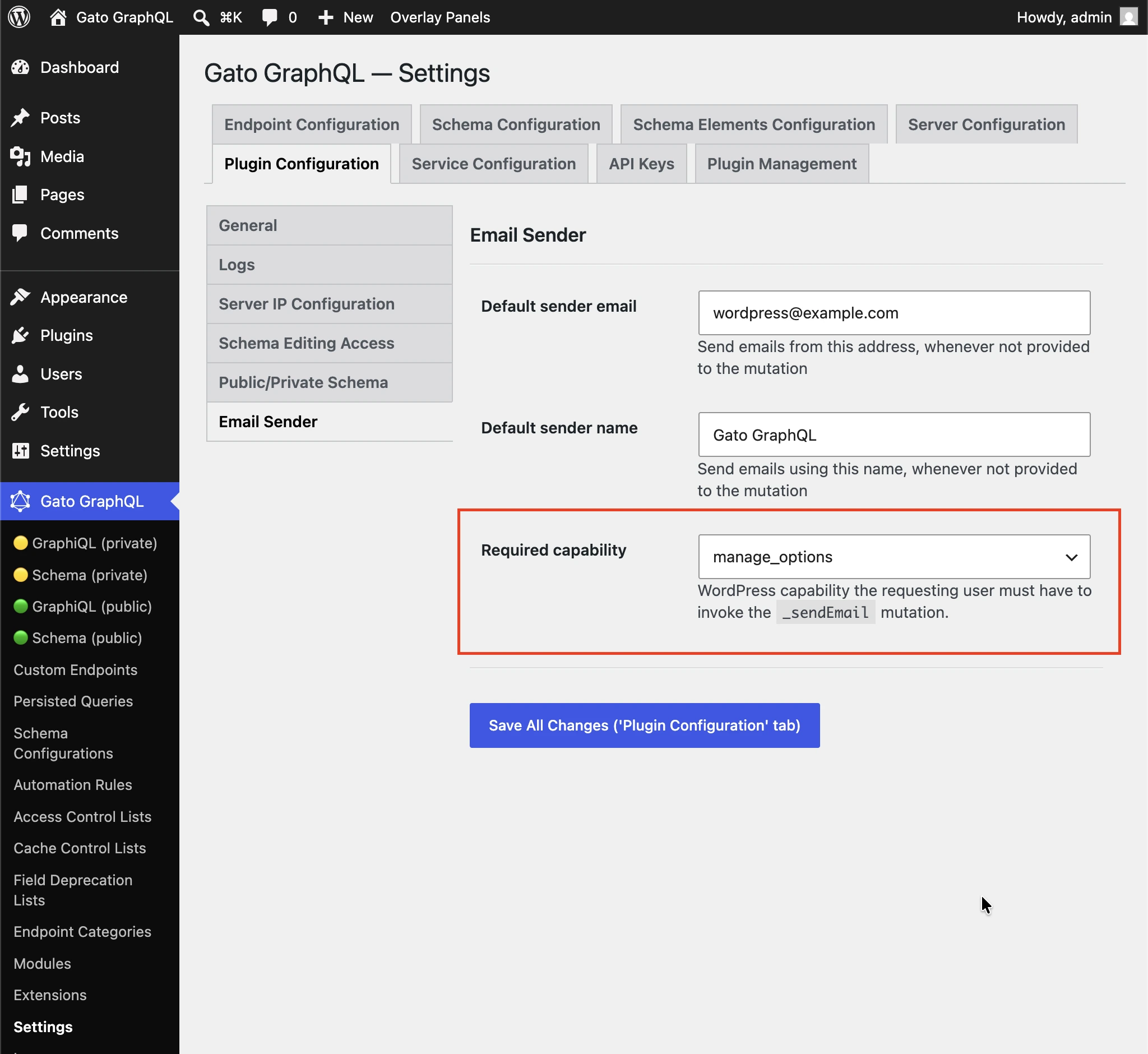
默认值为 manage_options,以防止订阅者使用此 mutation 向任意收件人发送垃圾邮件。
选择 (any logged-in user) 可禁用权限检查。
更多示例
以下 Query 将某篇文章的内容以电子邮件形式发送给管理员用户(例如:可在每次发布新文章时触发)。它使用了以下扩展:
- Multiple Query Execution — 将 Query 管理为逻辑单元
- Helper Function Collection — 使用 Markdown 编写电子邮件内容,并通过
_strConvertMarkdownToHTML将其转换为 HTML - PHP Functions via Schema — 通过
_strReplaceMultiple和_sprintf字段动态地将值注入电子邮件主题和内容 - Field to Input — 从
wp_options中获取并提供管理员的电子邮件地址
query GetPostData($postID: ID!) {
post(by: {id: $postID}) {
title @export(as: "postTitle")
excerpt @export(as: "postExcerpt")
url @export(as: "postLink")
author {
name @export(as: "postAuthorName")
url @export(as: "postAuthorLink")
}
}
}
query GetEmailData @depends(on: "GetPostData") {
emailMessageTemplate: _strConvertMarkdownToHTML(
text: """
There is a new post by [{$postAuthorName}]({$postAuthorLink}):
**{$postTitle}**: {$postExcerpt}
[Read online]({$postLink})
"""
)
emailMessage: _strReplaceMultiple(
search: ["{$postAuthorName}", "{$postAuthorLink}", "{$postTitle}", "{$postExcerpt}", "{$postLink}"],
replaceWith: [$postAuthorName, $postAuthorLink, $postTitle, $postExcerpt, $postLink],
in: $__emailMessageTemplate
)
@export(as: "emailMessage")
subject: _sprintf(string: "New post created by %s", values: [$postAuthorName])
@export(as: "emailSubject")
}
mutation SendEmail @depends(on: "GetEmailData") {
adminEmail: optionValue(name: "admin_email")
_sendEmail(
input: {
to: $__adminEmail
subject: $emailSubject
messageAs: {
html: $emailMessage
}
}
) {
status
}
}