

自动化WP-Cron
WP-Cron
以下操作钩子可供使用,从 WP-Cron 内部调用:
gatographql__execute_query
此钩子接收以下参数(按此顺序):
| # | 必填? | 参数 | 说明 |
|---|---|---|---|
| 1 | ✅ | $query | 要执行的 GraphQL Query |
| 2 | ❌ | $variables | GraphQL 变量 |
| 3 | ❌ | $operationName | 要执行的操作名称 |
| 4 | ❌ | $executeAsUser | 执行 Query 时登录的用户 |
| 5 | ❌ | $schemaConfigurationIDOrSlug | 执行 Query 时应用的 Schema 配置 ID(整数)或 slug(字符串)。传入 null 将使用默认值,传入 -1 表示「不使用 Schema 配置」 |
当 Query 需要已登录用户时(例如执行 mutation),需要使用 $executeAsUser 参数:
- 若已提供,具有指定 ID(整数)或用户名(字符串)的用户将在执行 GraphQL Query 前立即登录,执行完毕后立即登出。
- 若未提供,执行 Query 时将不会有用户登录。
gatographql__execute_persisted_query
此钩子接收以下参数(按此顺序):
| # | 必填? | 参数 | 说明 |
|---|---|---|---|
| 1 | ✅ | $persistedQueryIDOrSlug | Persisted Query 的 ID(整数)或 slug(字符串) |
| 2 | ❌ | $variables | GraphQL 变量 |
| 3 | ❌ | $operationName | 要执行的操作名称 |
| 4 | ❌ | $executeAsUser | 执行 Query 时登录的用户 |
请注意,要应用的 Schema 配置已在 persisted query 内部选定。
示例
以下 WP-Cron 事件执行钩子 gatographql__execute_persisted_query,发送每日邮件,显示站点新增评论数:
- 过去 24 小时内
- 过去 1 年内
- 本月初至今
- 本年初至今
我们创建一个 slug 为 "daily-stats-by-email-number-of-comments" 的 Persisted Query,内容如下:
query CountComments {
DATE_ISO8601: _env(name: DATE_ISO8601) @remove
timeToday: _time
dateToday: _date(format: $__DATE_ISO8601, timestamp: $__timeToday)
timeYesterday: _intSubtract(subtract: 86400, from: $__timeToday)
dateYesterday: _date(format: $__DATE_ISO8601, timestamp: $__timeYesterday)
time1YearAgo: _intSubtract(subtract: 31536000, from: $__timeToday)
date1YearAgo: _date(format: $__DATE_ISO8601, timestamp: $__time1YearAgo)
timeBegOfThisMonth: _makeTime(hour: 0, minute: 0, second: 0, day: 1)
dateBegOfThisMonth: _date(format: $__DATE_ISO8601, timestamp: $__timeBegOfThisMonth)
timeBegOfThisYear: _makeTime(hour: 0, minute: 0, second: 0, month: 1, day: 1)
dateBegOfThisYear: _date(format: $__DATE_ISO8601, timestamp: $__timeBegOfThisYear)
commentsAddedInLast24Hs: commentCount(filter: { dateQuery: { after: $__dateYesterday } } )
@export(as: "commentsAddedInLast24Hs")
commentsAddedInLast1Year: commentCount(filter: { dateQuery: { after: $__date1YearAgo } } )
@export(as: "commentsAddedInLast1Year")
commentsAddedSinceBegOfThisMonth: commentCount(filter: { dateQuery: { after: $__dateBegOfThisMonth } } )
@export(as: "commentsAddedSinceBegOfThisMonth")
commentsAddedSinceBegOfThisYear: commentCount(filter: { dateQuery: { after: $__dateBegOfThisYear } } )
@export(as: "commentsAddedSinceBegOfThisYear")
}
query CreateEmailMessage @depends(on: "CountComments") {
emailMessageTemplate: _strConvertMarkdownToHTML(
text: """
This is the number of comments added to the site:
| Period | # Comments added |
| --- | --- |
| **In the last 24 hs**: | {$commentsAddedInLast24Hs} |
| **In the last 365 days**: | {$commentsAddedInLast1Year} |
| **Since begginning of this month**: | {$commentsAddedSinceBegOfThisMonth} |
| **Since begginning of this year**: | {$commentsAddedSinceBegOfThisYear} |
"""
)
emailMessage: _strReplaceMultiple(
search: [
"{$commentsAddedInLast24Hs}",
"{$commentsAddedInLast1Year}",
"{$commentsAddedSinceBegOfThisMonth}",
"{$commentsAddedSinceBegOfThisYear}"
],
replaceWith: [
$commentsAddedInLast24Hs,
$commentsAddedInLast1Year,
$commentsAddedSinceBegOfThisMonth,
$commentsAddedSinceBegOfThisYear
],
in: $__emailMessageTemplate
)
@export(as: "emailMessage")
}
mutation SendDailyStatsByEmailNumberOfComments(
$to: [String!]!
)
@depends(on: "CreateEmailMessage")
{
_sendEmail(
input: {
to: $to
subject: "Daily stats: Number of new comments"
messageAs: {
html: $emailMessage
}
}
) {
status
}
}然后,通过 PHP 调度 WP-Cron 事件:
\wp_schedule_event(
time(),
'daily',
'gatographql__execute_persisted_query',
[
'daily-stats-by-email-number-of-comments',
[
'to' => ['admin@yoursite.com']
],
'SendDailyStatsByEmailNumberOfComments',
1 // This is the admin user's ID
]
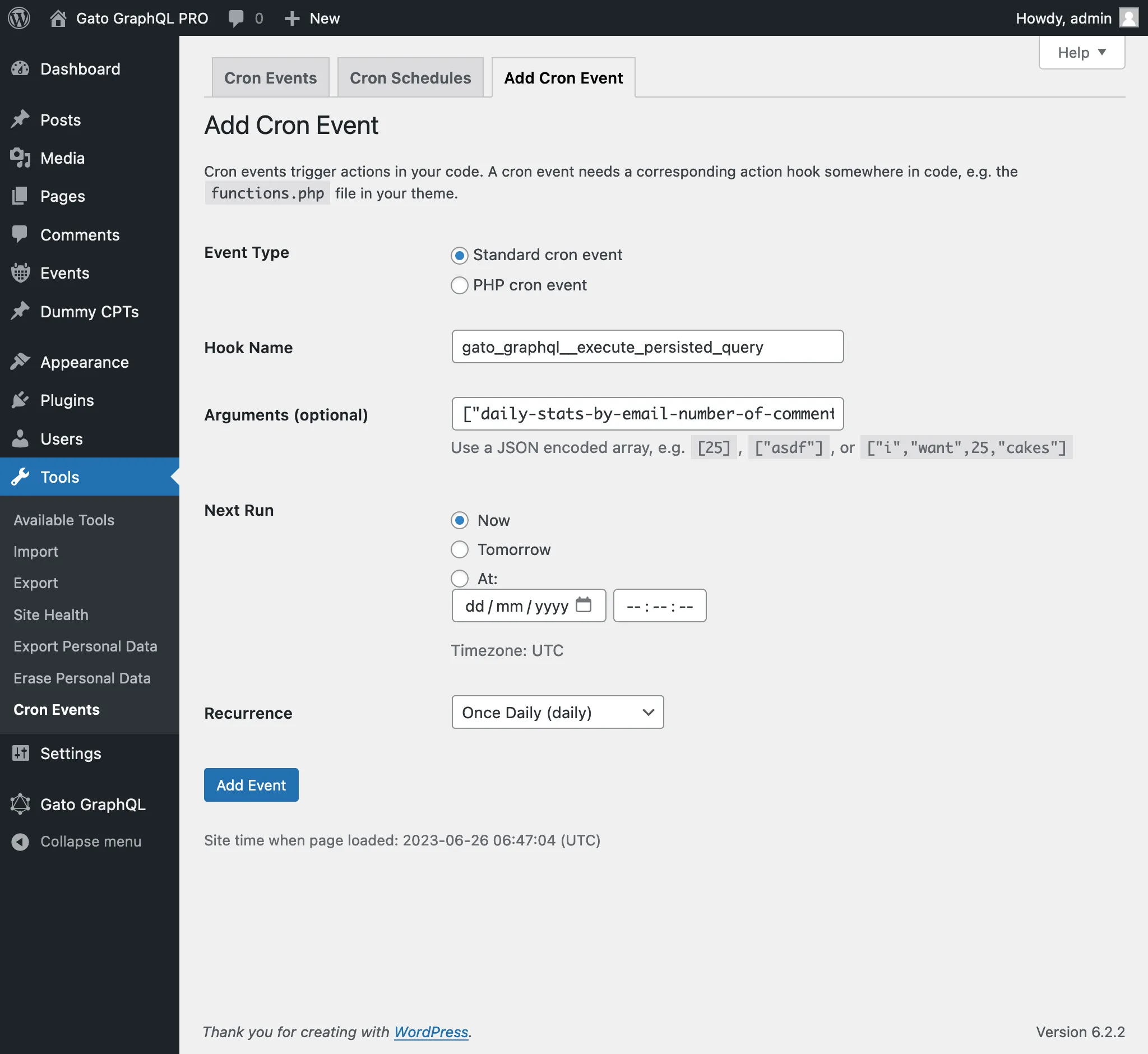
);或使用 WP-Crontrol 插件:
- 事件类型: Standard cron event
- 钩子名称:
gatographql__execute_persisted_query - 参数:
["daily-stats-by-email-number-of-comments",{"to":["admin@yoursite.com"]},"SendDailyStatsByEmailNumberOfComments",1] - 重复频率: Once Daily
Prev
Next