

Internal GraphQL Server
此扩展安装一个内部 GraphQL 服务器,可通过 PHP 代码在应用程序内调用。
在诸多使用场景中,您可以在某个操作发生时触发 GraphQL query 的执行,以执行相关任务(例如发送通知、添加日志条目、验证条件等)。
说明
内部 GraphQL 服务器通过类 GatoGraphQL\InternalGraphQLServer\GraphQLServer 访问,提供以下三个方法:
executeQuery:执行一个 GraphQL queryexecuteQueryInFile:执行包含在(.gql)文件中的 GraphQL queryexecutePersistedQuery:执行一个持久化 GraphQL query(以 int 形式提供其 ID,或以 string 形式提供其 slug)(需要 Persisted Queries 扩展)
方法签名如下:
namespace GatoGraphQL\InternalGraphQLServer;
use PoP\Root\HttpFoundation\Response;
class GraphQLServer {
/**
* Execute a GraphQL query
*/
public static function executeQuery(
string $query,
array $variables = [],
?string $operationName = null,
int|string|null $schemaConfigurationIDOrSlug = null,
): Response {
// ...
}
/**
* Execute a GraphQL query contained in a (`.gql`) file
*/
public static function executeQueryInFile(
string $file,
array $variables = [],
?string $operationName = null,
int|string|null $schemaConfigurationIDOrSlug = null,
): Response {
// ...
}
/**
* Execute a persisted GraphQL query (providing its object
* of type WP_Post, ID as an int, or slug as a string)
*/
public static function executePersistedQuery(
WP_Post|string|int $persistedQuery,
array $variables = [],
?string $operationName = null
): Response {
// ...
}
}执行 GraphQL query 并获取响应内容:
// Provide the GraphQL query
$query = "{ ... }";
// Execute the query against the internal server
$response = GraphQLServer::executeQuery($query);
// Get the content and decode it
$responseContent = json_decode($response->getContent(), true);
// Access the data and errors from the response
$responseData = $responseContent["data"] ?? [];
$responseErrors = $responseContent["errors"] ?? [];Response 对象还包含所有生成的响应头(例如:如果应用了 Cache Control List,则会添加 Cache-Control 响应头):
$responseHeaders = $response->getHeaders();
$responseCacheControlHeader = $response->getHeaderLine('Cache-Control');请注意,类 GraphQLServer 在 WordPress 核心的 init 钩子之前无法使用。
Schema 配置
内部 GraphQL 服务器应用其自己的 Schema 配置。例如,默认配置可在设置页面的「Internal GraphQL Server」选项卡中选择。
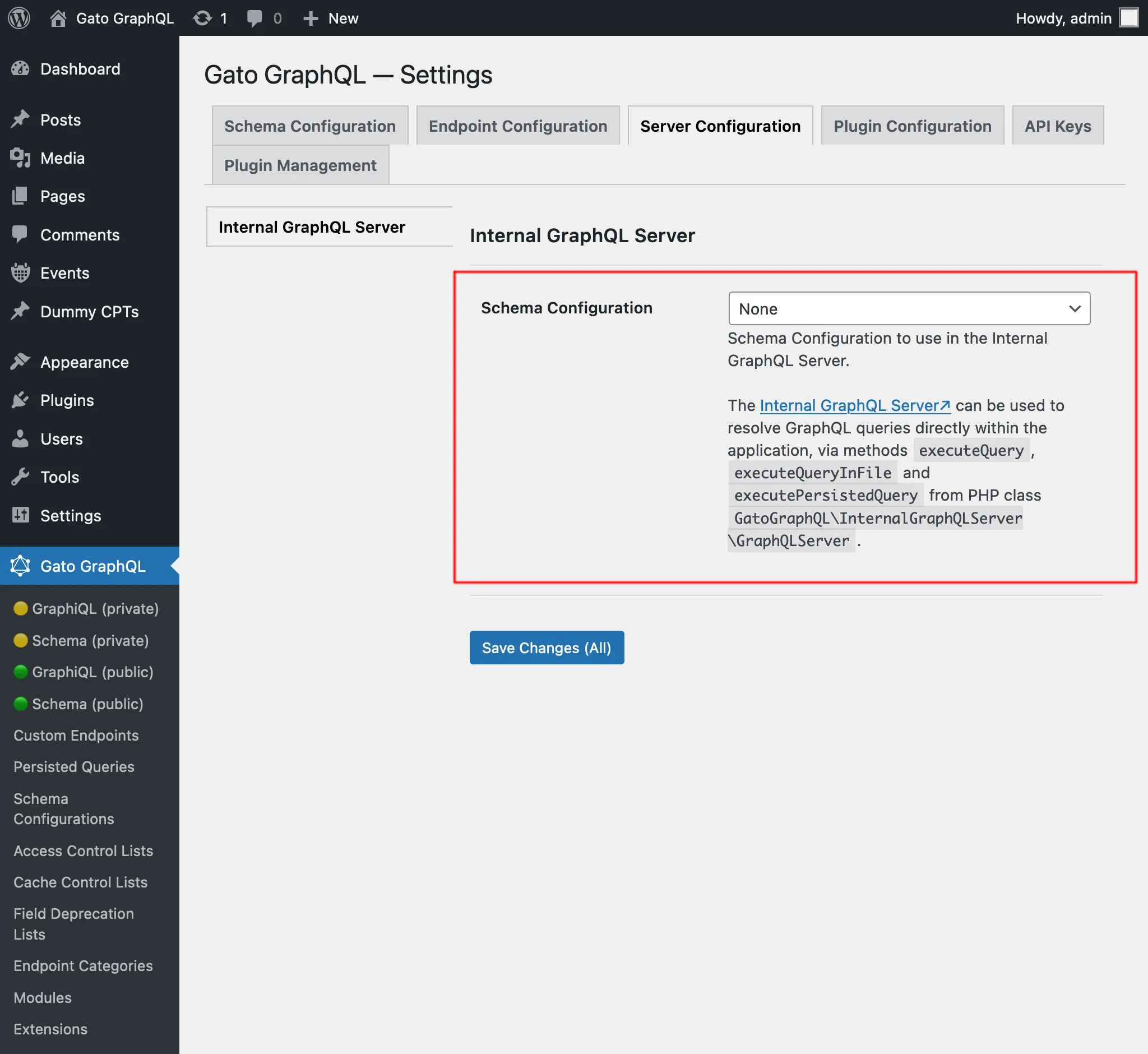
当针对内部 GraphQL 服务器执行的 query 由另一个 GraphQL query 触发、而该 query 正在使用不同配置的端点(例如公共端点 graphql/)进行解析时,此配置同样适用。
举例说明:假设我们将单一端点 graphql/ 配置为应用访问控制列表以按 IP 验证用户,并针对该端点执行 mutation createPost:
mutation {
createPost(input: {...}) {
# ...
}
}因此,只有来自该 IP 的访问者才能执行此 mutation。
然后在 publish_post 上设置一个钩子,对内部 GraphQL 服务器执行某个 query(例如:向站点管理员发送通知):
add_action(
"publish_post",
fn (int $post_id) => GraphQLServer::executeQuery("...", ["postID" => $post_id])
);此 GraphQL query 将使用应用于内部 GraphQL 服务器的 schema 配置进行解析,而不是单一端点 graphql/ 的配置。
因此,按用户 IP 的验证将不会执行(除非该访问控制列表也应用于内部 GraphQL 服务器)。
调试问题
要追踪 query 的执行情况,可以查看日志。
详情请参阅问题排查。
示例
在此示例工作流中(同时使用了 Multiple Query Execution、Helper Function Collection 和 Field to Input 模块),当站点创建新文章时,向管理员用户发送通知。
我们挂接到 WordPress 核心操作 new_to_publish,获取新创建文章的数据,并调用 GraphQLServer::executeQuery:
add_action(
'new_to_publish',
function (WP_Post $post) {
if ($post->post_type !== 'post') {
return;
}
// Check the contents of the query below
$query = ' ... ';
$variables = [
'postTitle' => $post->post_title,
'postContent' => $post->post_content,
]
GraphQLServer::executeQuery($query, $variables, 'SendEmail');
}
);...配合以下 GraphQL query 使用:
query GetEmailData(
$postTitle: String!,
$postContent: String!
) {
emailMessageTemplate: _strConvertMarkdownToHTML(
text: """
There is a new post on the site:
**{$postTitle}**:
{$postContent}
"""
)
emailMessage: _strReplaceMultiple(
search: ["{$postTitle}", "{$postContent}"],
replaceWith: [$postTitle, $postContent],
in: $__emailMessageTemplate
)
@export(as: "emailMessage")
}
mutation SendEmail @depends(on: "GetEmailData") {
_sendEmail(
input: {
to: "admin@site.com"
subject: "There is a new post"
messageAs: {
html: $emailMessage
}
}
) {
status
}
}