

HTTP 客户端
向 GraphQL 模式添加字段,以向 Web 服务器执行 HTTP 请求并获取其响应:
_sendJSONObjectItemHTTPRequest_sendJSONObjectItemHTTPRequests_sendJSONObjectCollectionHTTPRequest_sendJSONObjectCollectionHTTPRequests_sendHTTPRequest_sendHTTPRequests_sendGraphQLHTTPRequest_sendGraphQLHTTPRequests
出于安全原因,可连接的 URL 必须经过明确配置。
字段列表
以下字段将被添加到模式中。
_sendJSONObjectItemHTTPRequest
获取单个 JSON 对象的(REST)响应。
签名: _sendJSONObjectItemHTTPRequest(input: HTTPRequestInput!): JSONObject.
_sendJSONObjectItemHTTPRequests
从多个端点获取单个 JSON 对象的(REST)响应,可异步(并行)或同步(依次)执行。
签名: _sendJSONObjectItemHTTPRequests(async: Boolean = true, inputs: [HTTPRequestInput!]!): [JSONObject].
_sendJSONObjectCollectionHTTPRequest
获取 JSON 对象集合的(REST)响应。
签名: _sendJSONObjectCollectionHTTPRequest(input: HTTPRequestInput!): [JSONObject].
_sendJSONObjectCollectionHTTPRequests
从多个端点获取 JSON 对象集合的(REST)响应,可异步(并行)或同步(依次)执行。
签名: _sendJSONObjectCollectionHTTPRequests(async: Boolean = true, inputs: [HTTPRequestInput!]!): [[JSONObject]].
_sendHTTPRequest
连接到指定的 URL 并获取一个 HTTPResponse 对象,该对象包含以下字段:
statusCode: Int!contentType: String!body: String!headers: JSONObject!header(name: String!): StringhasHeader(name: String!): Boolean!
签名: _sendHTTPRequest(input: HTTPRequestInput!): HTTPResponse.
_sendHTTPRequests
与 _sendHTTPRequest 类似,但可接收多个 URL,并支持异步(并行)连接。
签名: _sendHTTPRequests(async: Boolean = true, inputs: [HTTPRequestInput!]!): [HTTPResponse].
_sendGraphQLHTTPRequest
向指定端点执行 GraphQL Query,并以 JSON 对象形式获取响应。
该字段的输入接受 GraphQL 所需的数据:端点、GraphQL Query、变量和操作名,并已预设默认方法(POST)和内容类型(application/json)。
签名: _sendGraphQLHTTPRequest(input: GraphQLRequestInput!): JSONObject.
_sendGraphQLHTTPRequests
与 _sendGraphQLHTTPRequests 类似,但可并发执行多个 GraphQL Query,可异步(并行)或同步(依次)执行。
签名: _sendGraphQLHTTPRequests(async: Boolean = true, inputs: [GraphQLRequestInput!]!): JSONObject.
配置允许的 URL
我们必须配置可连接的 URL 列表。
每个条目可以是:
- 正则表达式(regex),如果被
/或#包围,或 - 完整的 URL,否则
例如,以下任意条目都可匹配 URL "https://gatographql.com/recipes/":
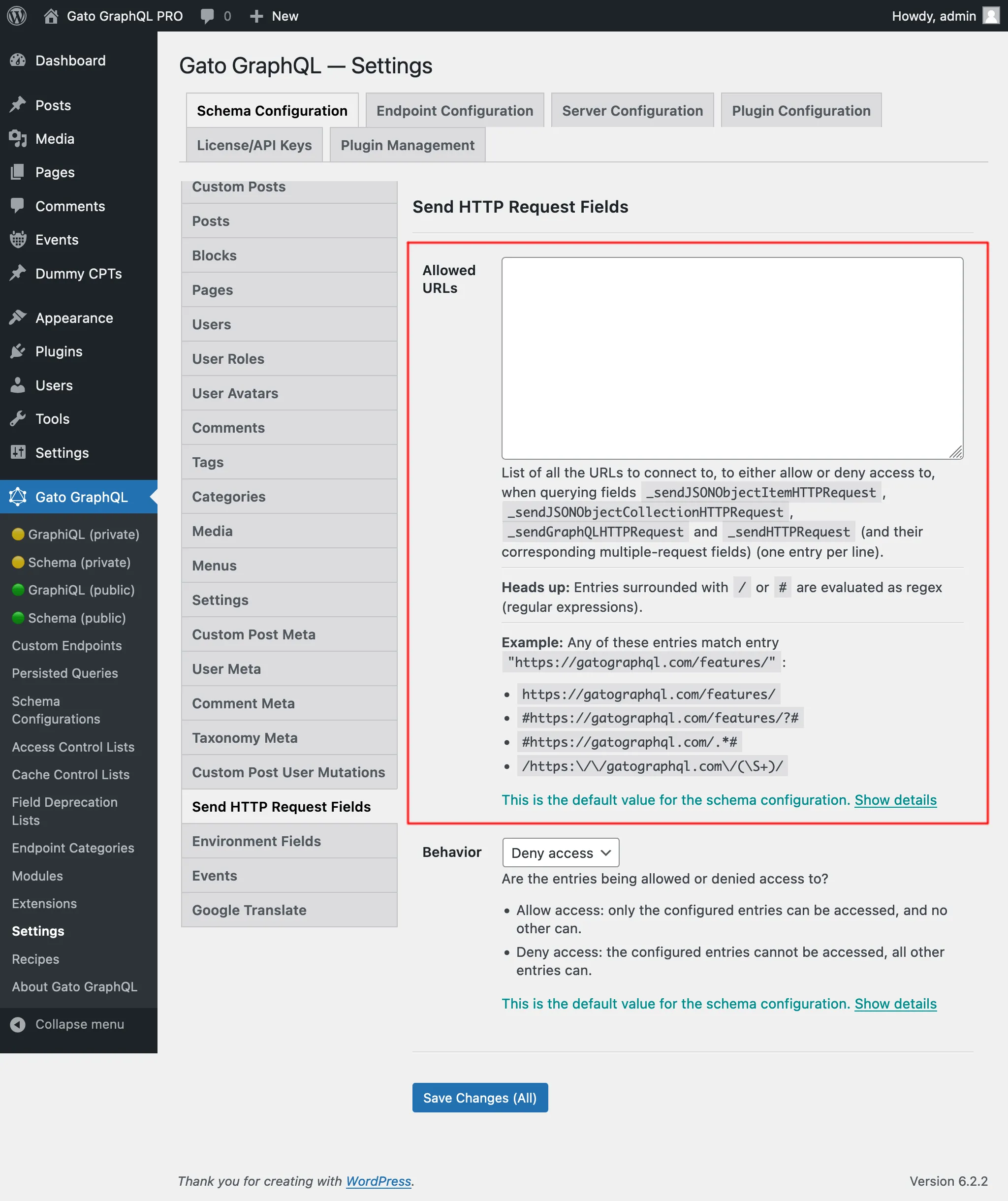
https://gatographql.com/recipes/#https://gatographql.com/recipes/?##https://gatographql.com/.*#/https:\\/\\/gatographql.com\\/(\S+)/
此配置可在以下两处进行,按优先级排序:
- 自定义:在对应的模式配置中
- 通用:在设置页面中
在应用于端点的模式配置中,选择选项 "Use custom configuration" 并输入所需条目:
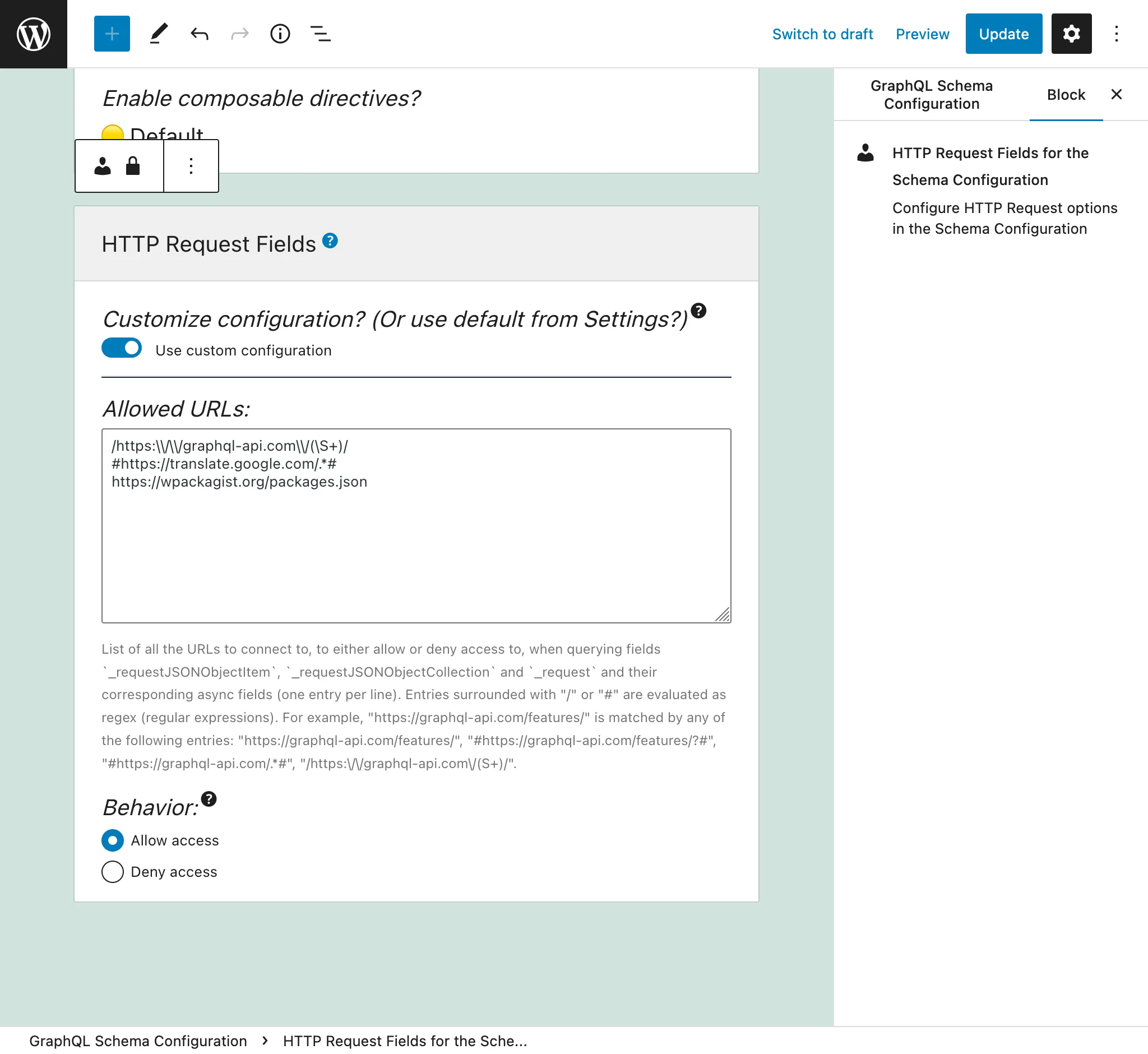
否则,将使用设置中「Send HTTP Request Fields」选项卡里定义的条目:
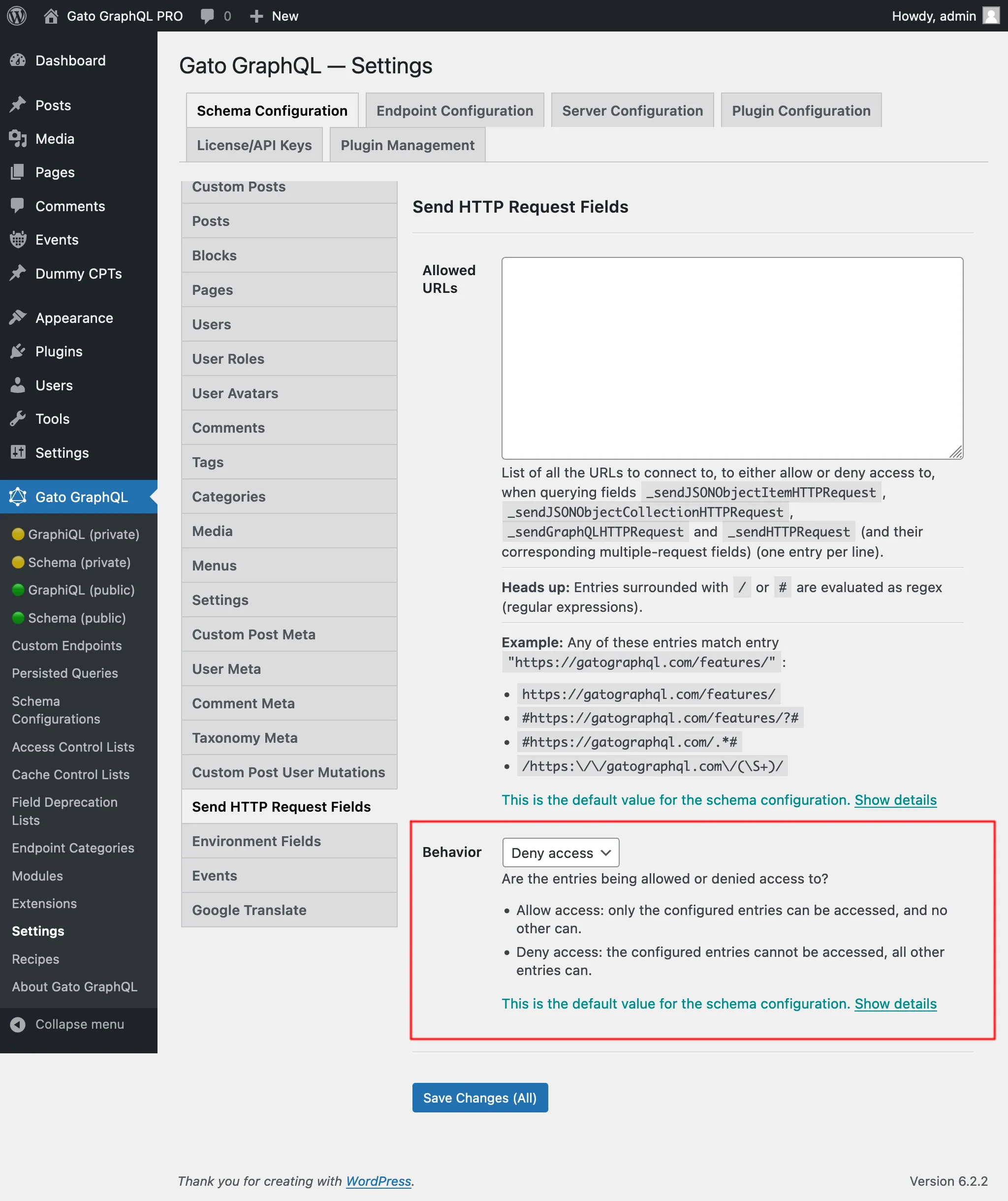
有「允许访问」和「拒绝访问」两种行为:
- 允许访问: 只有已配置的条目可以访问,其他条目均不可访问
- 拒绝访问: 已配置的条目不可访问,所有其他条目均可访问
访问内部 URL 所需的权限
某些 URL 会解析到内部地址(127.0.0.1、链路本地范围、云元数据端点等),若被访问可能暴露内部服务。此设置在设置页面的 Plugin Configuration > HTTP Client 下配置。
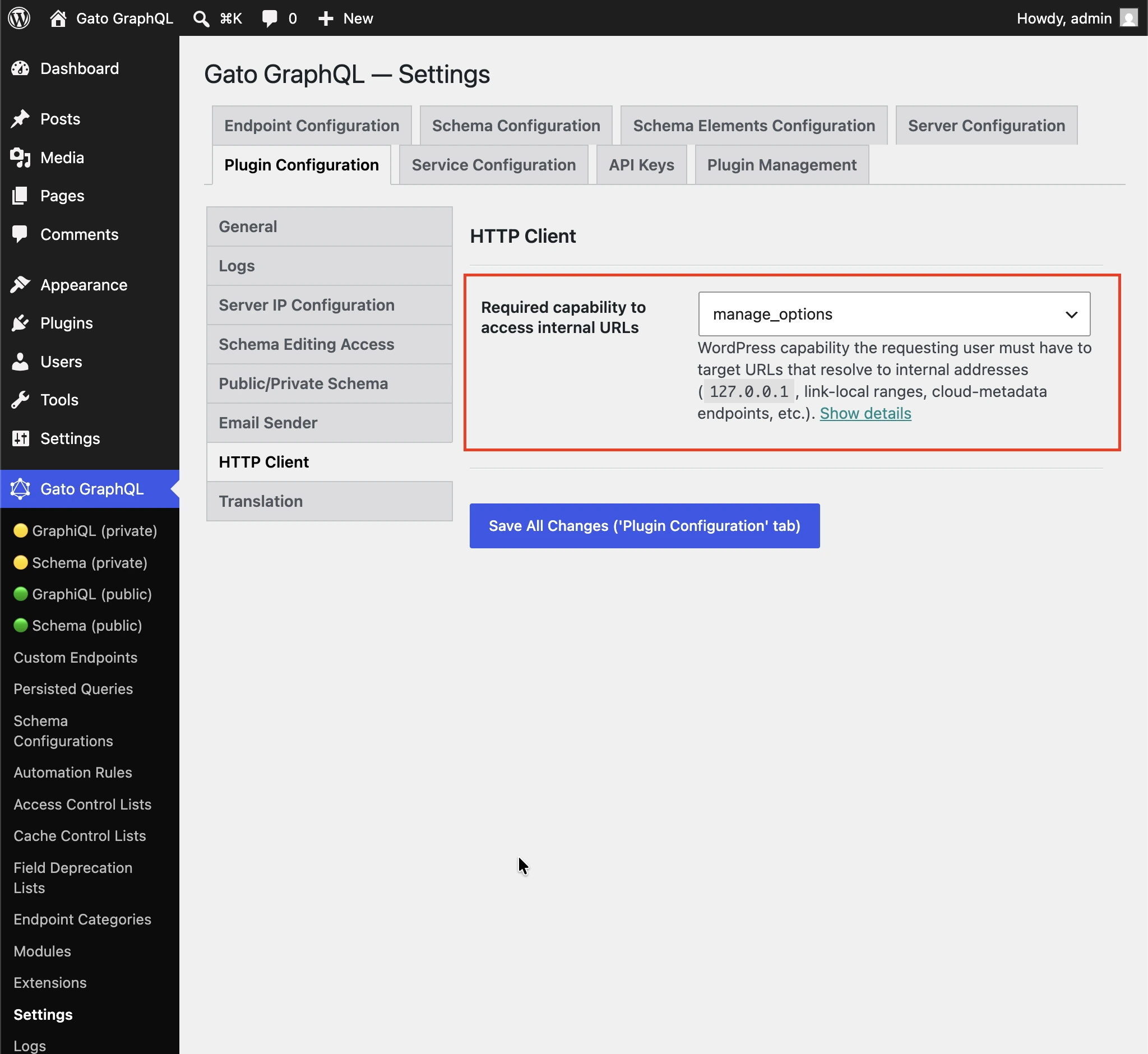
请求用户必须具备的 WordPress 权限,才能访问解析到内部地址(127.0.0.1、链路本地范围、云元数据端点等)的 URL。
默认设置为 manage_options,以防止非管理员用户通过 HTTP 客户端字段访问内部服务。
选择 (任意已登录用户) 可禁用权限检查。
各字段的使用场景
所有字段相似但各有不同。
_sendJSONObjectItemHTTPRequest
此字段获取一个 JSON 对象条目,适用于从 REST 端点查询单个条目,例如 WP REST API 端点 /wp-json/wp/v2/posts/1/。
此 Query:
{
postData: _sendJSONObjectItemHTTPRequest(input: { url: "https://newapi.getpop.org/wp-json/wp/v2/posts/1/" } )
}...获取以下响应:
{
"data": {
"postData": {
"id": 1,
"date": "2019-08-02T07:53:57",
"date_gmt": "2019-08-02T07:53:57",
"guid": {
"rendered": "https:\/\/newapi.getpop.org\/?p=1"
},
"modified": "2021-01-14T13:18:39",
"modified_gmt": "2021-01-14T13:18:39",
"slug": "hello-world",
"status": "publish",
"type": "post",
"link": "https:\/\/newapi.getpop.org\/uncategorized\/hello-world\/",
"title": {
"rendered": "Hello world!"
},
"content": {
"rendered": "\n<p>Welcome to WordPress. This is your first post. Edit or delete it, then start writing!<\/p>\n\n\n\n<p>I’m demonstrating a Youtube video:<\/p>\n\n\n\n<figure class=\"wp-block-embed is-type-video is-provider-youtube wp-block-embed-youtube wp-embed-aspect-16-9 wp-has-aspect-ratio\"><div class=\"wp-block-embed__wrapper\">\n<iframe loading=\"lazy\" title=\"Introduction to the Component-based API by Leonardo Losoviz | JSConf.Asia 2019\" width=\"750\" height=\"422\" src=\"https:\/\/www.youtube.com\/embed\/9pT-q0SSYow?feature=oembed\" frameborder=\"0\" allow=\"accelerometer; autoplay; clipboard-write; encrypted-media; gyroscope; picture-in-picture\" allowfullscreen><\/iframe>\n<\/div><figcaption>This is my presentation in JSConf Asia 2019<\/figcaption><\/figure>\n",
"protected": false
},
"excerpt": {
"rendered": "<p>Welcome to WordPress. This is your first post. Edit or delete it, then start writing! I’m demonstrating a Youtube video:<\/p>\n",
"protected": false
},
"author": 1,
"featured_media": 0,
"comment_status": "closed",
"ping_status": "open",
"sticky": false,
"template": "",
"format": "standard",
"meta": [],
"categories": [
1
],
"tags": [
193,
173
]
}
}
}_sendJSONObjectCollectionHTTPRequest
此字段与 _sendJSONObjectItemHTTPRequest 类似,但获取的是 JSON 对象集合,例如来自 WP REST API 端点 /wp-json/wp/v2/posts/。
此 Query:
{
postData: _sendJSONObjectItemHTTPRequest(input: { url: "https://newapi.getpop.org/wp-json/wp/v2/posts/?per_page=3&_fields=id,type,title,date" } )
}...获取以下响应:
{
"data": {
"postData": [
{
"id": 1692,
"date": "2022-04-26T10:10:08",
"type": "post",
"title": {
"rendered": "My Blogroll"
}
},
{
"id": 1657,
"date": "2020-12-21T08:24:18",
"type": "post",
"title": {
"rendered": "A tale of two cities – teaser"
}
},
{
"id": 1499,
"date": "2019-08-08T02:49:36",
"type": "post",
"title": {
"rendered": "COPE with WordPress: Post demo containing plenty of blocks"
}
}
]
}
}_sendHTTPRequest
此字段获取包含响应所有属性的 HTTPResponse 对象,因此可以独立查询正文(类型为 String,即不会被转换为 JSON)、状态码、内容类型和标头。
例如,以下 Query:
{
_sendHTTPRequest(
input: {
url: "https://newapi.getpop.org/wp-json/wp/v2/comments/11/?_fields=id,date,content"
}
) {
statusCode
contentType
headers
body
contentLengthHeader: header(name: "Content-Length")
cacheControlHeader: header(name: "Cache-Control")
}
}...返回以下响应:
{
"data": {
"_sendHTTPRequest": {
"statusCode": 200,
"contentType": "application\/json; charset=UTF-8",
"headers": {
"Access-Control-Allow-Headers": "Authorization, X-WP-Nonce, Content-Disposition, Content-MD5, Content-Type",
"Access-Control-Expose-Headers": "X-WP-Total, X-WP-TotalPages, Link",
"Allow": "GET",
"Cache-Control": "max-age=300,no-store",
"Content-Length": "508"
},
"body": "{\"id\":11,\"date\":\"2020-12-12T04:09:36\",\"content\":{\"rendered\":\"<p>Wow, this sounds awesome!<\\\/p>\\n\"},\"_links\":{\"self\":[{\"href\":\"https:\\\/\\\/newapi.getpop.org\\\/wp-json\\\/wp\\\/v2\\\/comments\\\/11\"}],\"collection\":[{\"href\":\"https:\\\/\\\/newapi.getpop.org\\\/wp-json\\\/wp\\\/v2\\\/comments\"}],\"author\":[{\"embeddable\":true,\"href\":\"https:\\\/\\\/newapi.getpop.org\\\/wp-json\\\/wp\\\/v2\\\/users\\\/3\"}],\"up\":[{\"embeddable\":true,\"post_type\":\"post\",\"href\":\"https:\\\/\\\/newapi.getpop.org\\\/wp-json\\\/wp\\\/v2\\\/posts\\\/28\"}]}}",
"contentLengthHeader": "508",
"cacheControlHeader": "max-age=300,no-store"
}
}
}_sendGraphQLHTTPRequest
执行以下 Query:
{
graphQLRequest: _sendGraphQLHTTPRequest(
input: {
endpoint: "https://newapi.getpop.org/api/graphql/"
query: """
query GetPosts($postIDs: [ID]!) {
posts(filter: { ids: $postIDs }) {
id
title
}
}
"""
variables: [
{
name: "postIDs",
value: [1, 1499]
}
]
}
)
}...将返回以下响应:
{
"data": {
"graphQLRequest": {
"data": {
"posts": [
{
"id": 1499,
"title": "COPE with WordPress: Post demo containing plenty of blocks"
},
{
"id": 1,
"title": "Hello world!"
}
]
}
}
}
}多请求字段:_sendJSONObjectItemHTTPRequests、_sendJSONObjectCollectionHTTPRequests、_sendGraphQLHTTPRequests 和 _sendHTTPRequests
这些字段与对应的单请求字段类似,但可同时从多个端点获取数据,可异步(并行)或同步(依次)执行。响应以列表形式返回,顺序与 urls 参数中定义的 URL 顺序一致。
例如,以下 Query:
{
weatherForecasts: _sendJSONObjectItemHTTPRequests(
urls: [
"https://api.weather.gov/gridpoints/TOP/31,80/forecast",
"https://api.weather.gov/gridpoints/TOP/41,55/forecast"
]
)
}...生成以下响应:
{
"data": {
"weatherForecasts": [
{
"type": "Feature",
"geometry": {
"type": "Polygon",
"coordinates": [
[
[
-97.1089731,
39.766826299999998
],
[
-97.108526900000001,
39.744778799999999
]
]
]
},
"properties": {
"updated": "2022-03-04T09:39:46+00:00",
"units": "us",
"forecastGenerator": "BaselineForecastGenerator",
"generatedAt": "2022-03-04T10:31:47+00:00",
"updateTime": "2022-03-04T09:39:46+00:00",
"validTimes": "2022-03-04T03:00:00+00:00/P7DT22H",
"elevation": {
"unitCode": "wmoUnit:m",
"value": 441.95999999999998
}
}
},
{
"type": "Feature",
"geometry": {
"type": "Polygon",
"coordinates": [
[
[
-96.812529900000001,
39.218048000000003
],
[
-96.812148500000006,
39.195940300000004
]
]
]
},
"properties": {
"updated": "2022-03-04T09:39:46+00:00",
"units": "us",
"forecastGenerator": "BaselineForecastGenerator",
"generatedAt": "2022-03-04T10:42:26+00:00",
"updateTime": "2022-03-04T09:39:46+00:00",
"validTimes": "2022-03-04T03:00:00+00:00/P7DT22H",
"elevation": {
"unitCode": "wmoUnit:m",
"value": 409.04160000000002
}
}
}
]
}
}同步执行与异步执行
以下字段支持执行多个请求:
_sendHTTPRequests_sendJSONObjectItemHTTPRequests_sendJSONObjectCollectionHTTPRequests_sendGraphQLHTTPRequests
这些字段接受输入 $async,用于定义请求是同步执行($async => false)还是异步执行。
同步执行
HTTP 请求按顺序执行,每个请求在前一个请求解析完成后立即执行。
当所有 HTTP 请求均成功时,字段将以与输入列表相同的顺序输出包含响应的数组。
若任意 HTTP 请求失败,执行将立即停止,即输入列表中后续的 HTTP 请求不会被执行。
HTTP 请求可能失败的原因包括:
- 要连接的服务器处于离线状态
- 响应的状态码不为 200:500 内部错误、404 未找到、403 禁止等
- 响应的内容类型不是
application/json
(后两种情况在 _sendJSONObjectItemHTTPRequests、_sendJSONObjectCollectionHTTPRequests 和 _sendGraphQLHTTPRequests 中被视为错误,因为它们只处理 JSON 类型;而 _sendHTTPRequests 不做此类限制。)
发生错误时,字段返回 null(即之前成功的 HTTP 请求的响应不会被输出),错误条目中将包含扩展字段 httpRequestInputArrayPosition,用于指示输入列表中哪个条目失败(从 0 开始):
{
"errors": [
{
"message": "Server error: `GET https:\/\/mysite.com\/page-triggering-some-500-error` resulted in a `500 Internal Server Error` response",
"extensions": {
"httpRequestInputArrayPosition": 0,
"field": "_sendJSONObjectItemHTTPRequests(async: false, inputs: [{url: \"https:\/\/mysite.com\/page-triggering-some-500-error\"}, {url: \"https:\/\/mysite.com\/wp-json\/wp\/v2\/posts\/1\/\"}, {url: \"https:\/\/mysite.com\/wp-json\/wp\/v2\/users\/1\/\"}])"
}
}
],
"data": {
"_sendJSONObjectItemHTTPRequests": null
}
}异步执行
所有 HTTP 请求并发执行(即并行),HTTP 请求的解析顺序不确定。
当所有 HTTP 请求均成功时,字段将以与输入列表相同的顺序输出包含响应的数组。
一旦任意 HTTP 请求失败,执行将立即停止,但此时其他所有 HTTP 请求也可能已经执行。
此外,服务器不会指示列表中哪个条目失败(注意以下响应中没有 httpRequestInputArrayPosition 扩展字段):
{
"errors": [
{
"message": "Server error: `GET https:\/\/mysite.com\/page-triggering-some-500-error` resulted in a `500 Internal Server Error` response",
"extensions": {
"field": "_sendJSONObjectItemHTTPRequests(async: true, inputs: [{url: \"https:\/\/mysite.com\/page-triggering-some-500-error\"}, {url: \"https:\/\/mysite.com\/wp-json\/wp\/v2\/posts\/1\/\"}, {url: \"https:\/\/mysite.com\/wp-json\/wp\/v2\/users\/1\/\"}])"
}
}
],
"data": {
"_sendJSONObjectItemHTTPRequests": null
}
}全局字段
这些字段均为全局字段,因此它们会被添加到 GraphQL 模式中的每个类型:不仅是 QueryRoot,还包括 Post、User、Comment 等。
这使我们能够在同一 GraphQL Query 中,根据某个实体存储的数据,在运行时连接到动态生成的外部 API 端点。
例如,我们可以遍历数据库中的用户列表,并针对每个用户连接到外部系统(如 CRM)以获取更多相关数据。
在此 Query 中,我们使用 Field to Input 功能和 _arrayJoin 函数字段来生成 API 端点:
{
users(
pagination: { limit: 2 },
sort: { order: ASC, by: ID }
) {
id
endpoint: _arrayJoin(values: [
"https://newapi.getpop.org/wp-json/wp/v2/users/",
$__id,
"?_fields=name"
])
_sendJSONObjectItemHTTPRequest(input: { url: $__endpoint } )
}
}...生成:
{
"data": {
"users": [
{
"id": 1,
"endpoint": "https://newapi.getpop.org/wp-json/wp/v2/users/1?_fields=name",
"_sendJSONObjectItemHTTPRequest": {
"name": "leo",
"_links": {
"self": [
{
"href": "https://newapi.getpop.org/wp-json/wp/v2/users/1"
}
],
"collection": [
{
"href": "https://newapi.getpop.org/wp-json/wp/v2/users"
}
]
}
}
},
{
"id": 2,
"endpoint": "https://newapi.getpop.org/wp-json/wp/v2/users/2?_fields=name",
"_sendJSONObjectItemHTTPRequest": {
"name": "themedemos",
"_links": {
"self": [
{
"href": "https://newapi.getpop.org/wp-json/wp/v2/users/2"
}
],
"collection": [
{
"href": "https://newapi.getpop.org/wp-json/wp/v2/users"
}
]
}
}
}
]
}
}