


🚀 Gato GraphQL v1.2 发布(搭载全新 Persisted Queries)

Gato GraphQL 版本 1.2 已正式发布! 🎉
以下是所有变更内容的说明。
新增多个预定义 Persisted Queries
现已提供以下用于执行常见管理任务的 Persisted Queries:
翻译来自 URL 的内容
以 URL 作为输入,指定其语言及目标翻译语言,此 query 将从该 URL 获取内容,并使用 Google Translate 执行翻译:
query TranslateContent(
$url: URL!
$fromLang: String!
$toLang: String!
) {
_sendHTTPRequest(input: {
url: $url,
method: GET
}) {
body
translated: body @strTranslate(
from: $fromLang
to: $toLang
)
}
}例如,传入 GitHub 仓库中某个 Markdown 文件的 URL 及语言代码 "es":
{
"url": "https://raw.githubusercontent.com/GatoGraphQL/GatoGraphQL/c870d8906ae1aec3c81acc039c53acc7aab5dff0/layers/GatoGraphQLForWP/plugins/gatographql/docs/modules/single-endpoint/en.md",
"fromLang": "en",
"toLang": "es"
}...将把 Markdown 内容翻译为西班牙语:
{
"data": {
"_sendHTTPRequest": {
"body": "# Single Endpoint\n\nExecute queries against the GraphQL server through the public single endpoint.\n\nBy default the endpoint is `/graphql/`, and the path can be configured through the Settings.\n\n\n\nThe GraphQL single endpoint can be configured by assigning a Schema Configuration to it. To do this, on section \"Schema Configuration\" select the desired entry from the dropdown for \"Schema Configuration for the Single Endpoint\":\n\n<div class=\"img-width-1024\" markdown="1">\n\n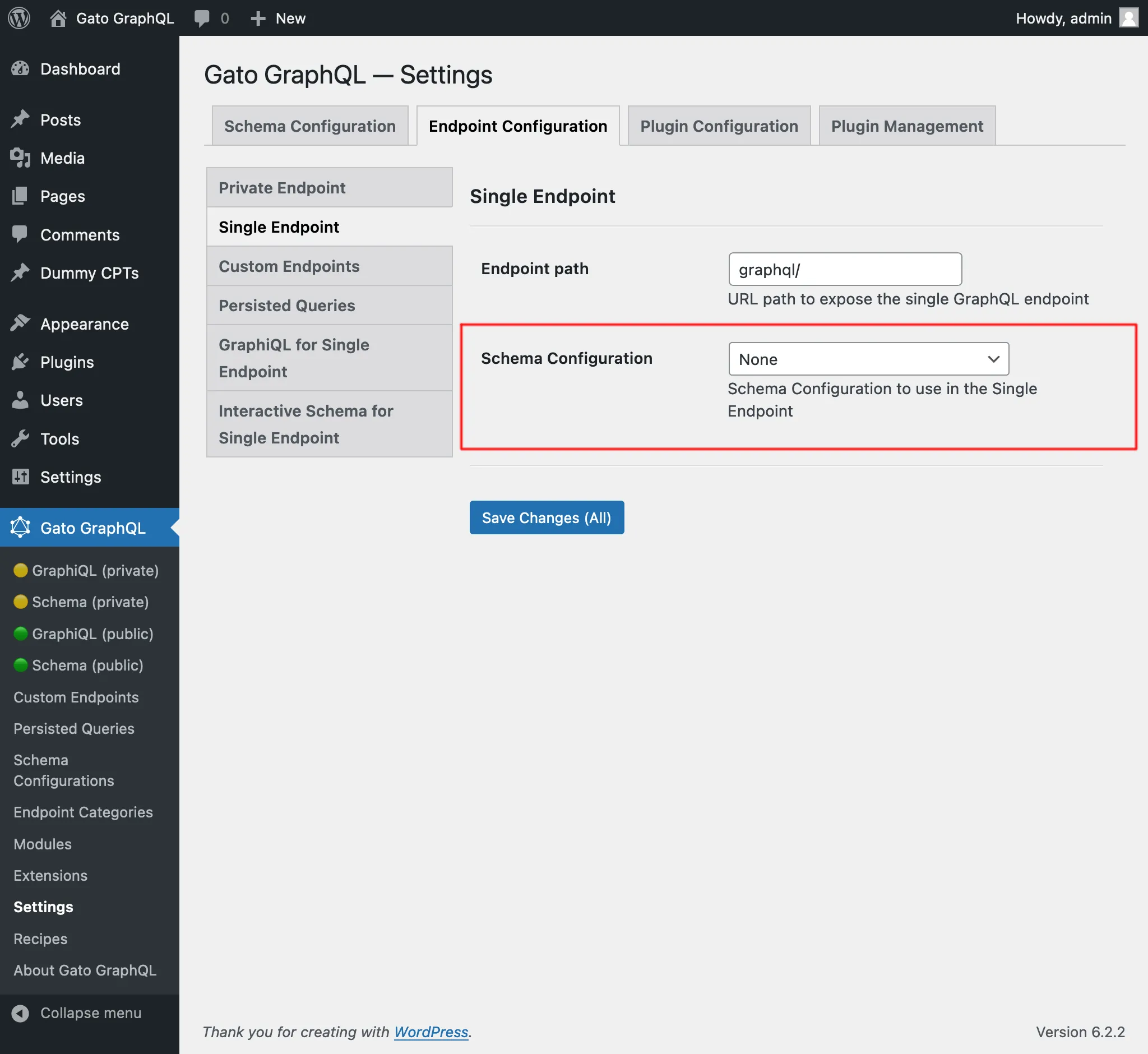\n\n</div>\n\n## Clients\n\nInteract with the single endpoint via the available clients.\n\n### GraphiQL\n\nIf module \"GraphiQL for Single Endpoint\" is enabled, then the single endpoint's GraphiQL client becomes publicly available.\n\nTo open it, click on link \"🟢 GraphiQL (public)\" on the plugin's menu:\n\n<div class=\"img-width-1024\" markdown="1">\n\n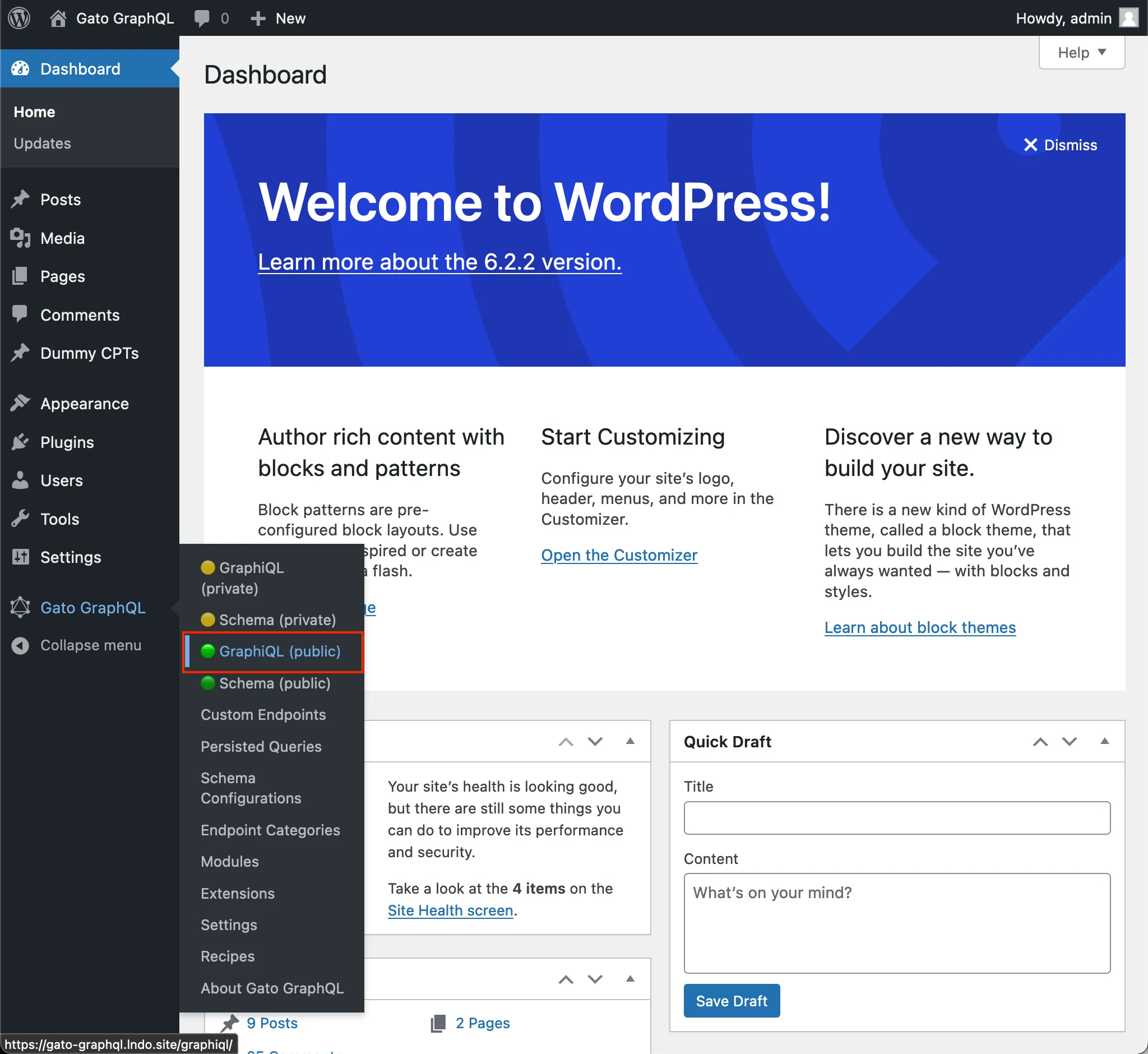\n\n</div>\n\nBy default, the client is exposed under `/graphiql/`. This path can be modified on the Settings, under tab \"GraphiQL for Single Endpoint\":\n\n<div class=\"img-width-1024\" markdown="1">\n\n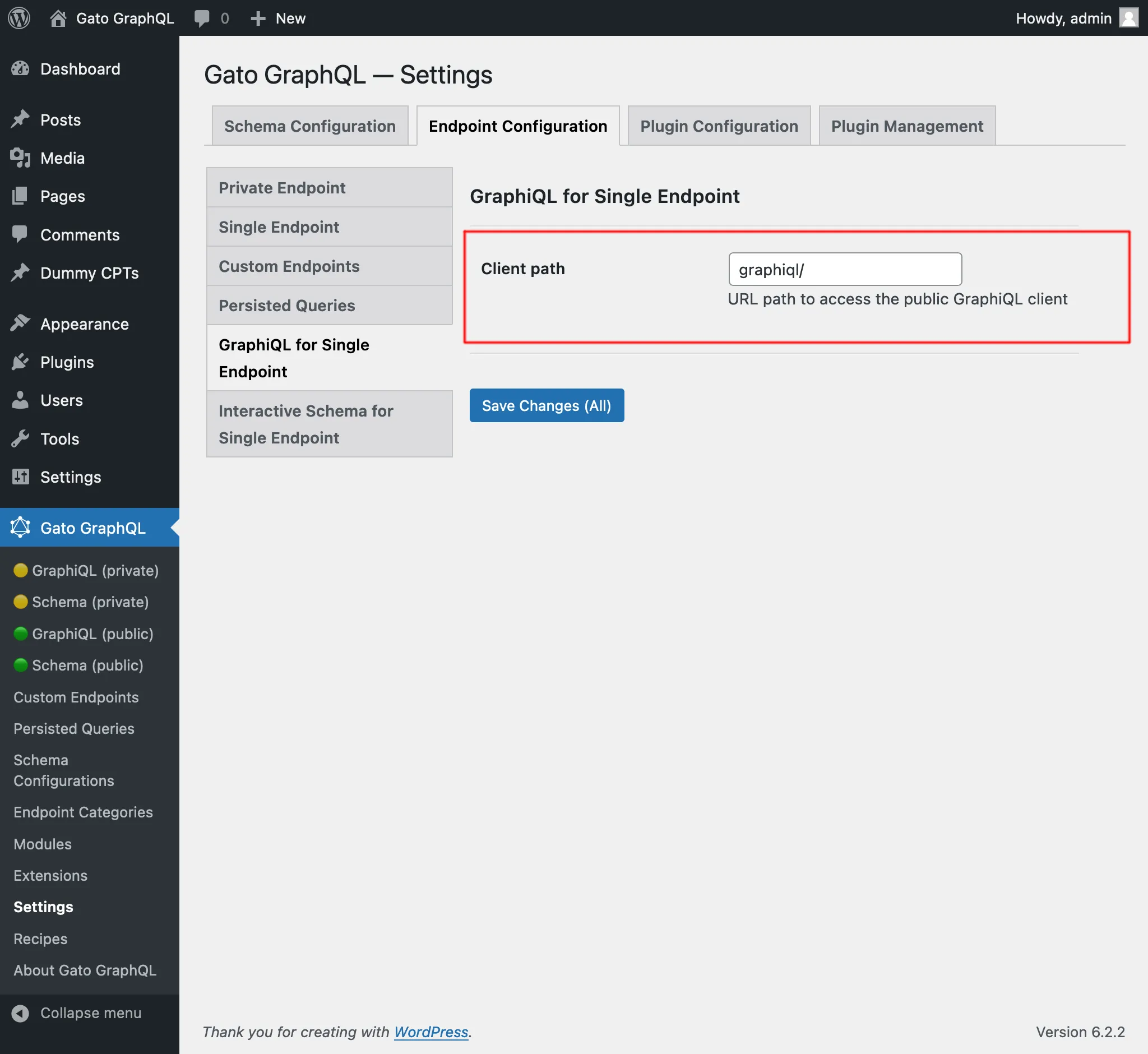\n\n</div>\n\n### Interactive Schema (Voyager)\n\nIf module \"Interactive Schema for Single Endpoint\" is enabled, then the single endpoint's Voyager client becomes publicly available.\n\nTo open it, click on link \"🟢 Schema (public)\" on the plugin's menu:\n\n<div class=\"img-width-1024\" markdown="1">\n\n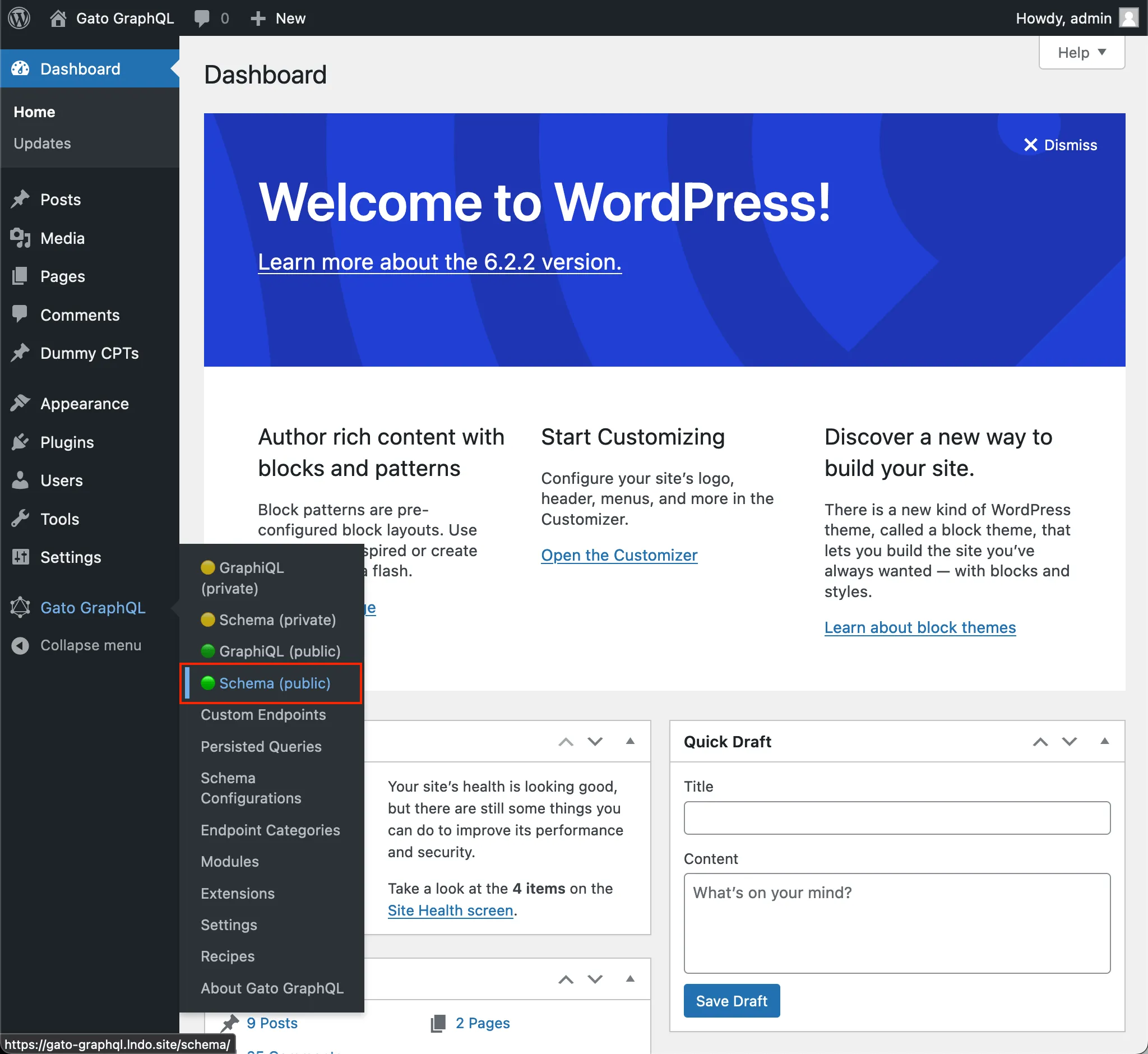\n\n</div>\n\nBy default, the client is exposed under `/schema/`. This path can be modified on the Settings, under tab \"Interactive Schema for Single Endpoint\":\n\n<div class=\"img-width-1024\" markdown="1">\n\n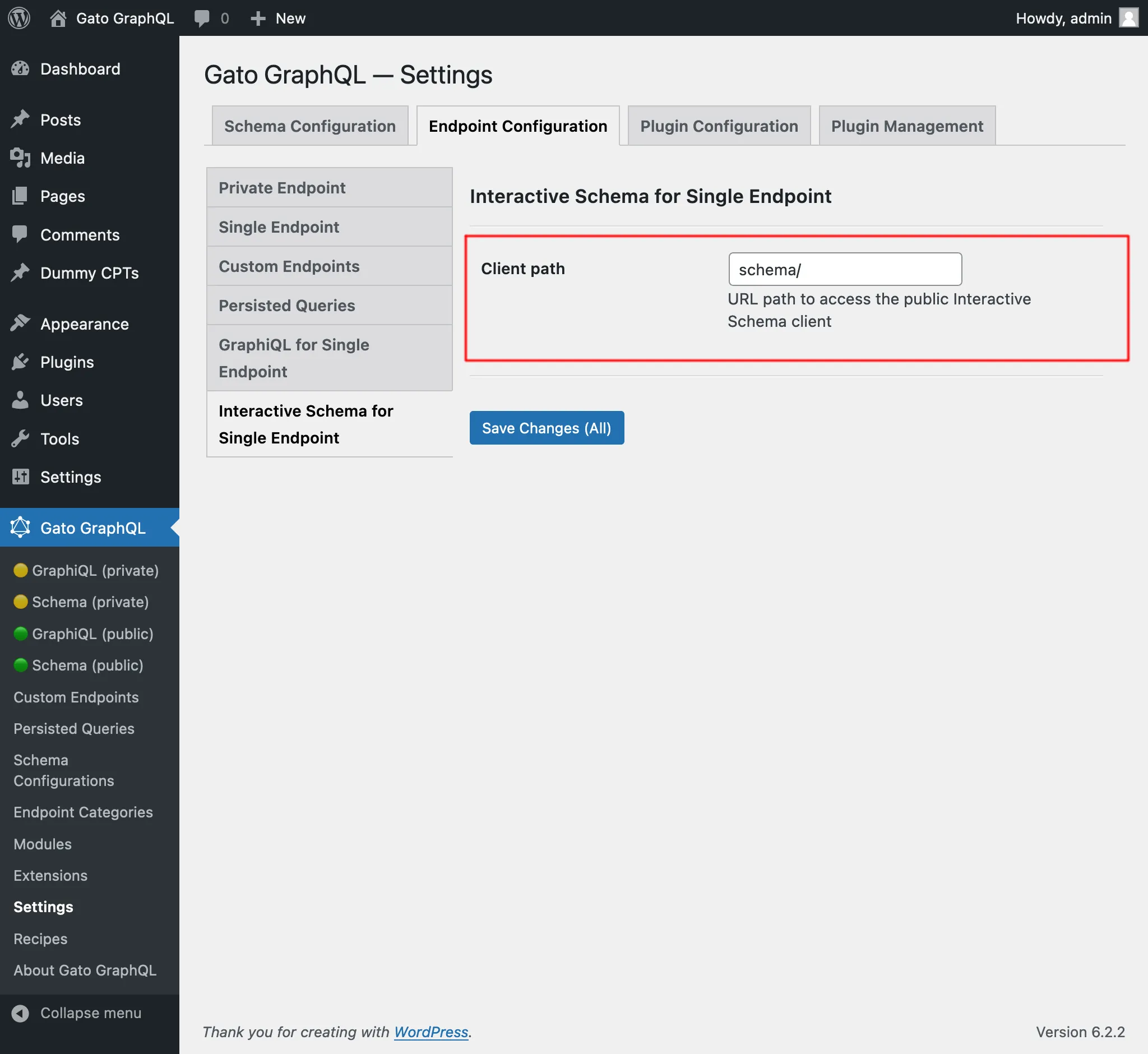\n\n</div>\n",
"translated": "# Punto final único\n\nEjecute consultas en el servidor GraphQL a través del punto final único público.\n\nDe forma predeterminada, el punto final es `/graphql/` y la ruta se puede configurar a través de Configuración.\n\n\n\nEl punto final único GraphQL se puede configurar asignándole una configuración de esquema. Para hacer esto, en la sección \"Configuración del esquema\", seleccione la entrada deseada del menú desplegable para \"Configuración del esquema para el punto final único\":\n\n<div class=\"img-width-1024\" descuento=1>\n\n\n\n</div>\n\n## Clientes\n\nInteractúe con el punto final único a través de los clientes disponibles.\n\n### GrafiQL\n\nSi el módulo \"GraphiQL para punto final único\" está habilitado, el cliente GraphiQL del punto final único estará disponible públicamente.\n\nPara abrirlo, haga clic en el enlace \"🟢 GraphiQL (público)\" en el menú del complemento:\n\n<div class=\"img-width-1024\" descuento=1>\n\n\n\n</div>\n\nDe forma predeterminada, el cliente está expuesto en `/graphiql/`. Esta ruta se puede modificar en Configuración, en la pestaña \"GraphiQL para punto final único\":\n\n<div class=\"img-width-1024\" descuento=1>\n\n\n\n</div>\n\n### Esquema interactivo (Voyager)\n\nSi el módulo \"Esquema interactivo para punto final único\" está habilitado, el cliente Voyager del punto final único estará disponible públicamente.\n\nPara abrirlo, haga clic en el enlace \"🟢 Esquema (público)\" en el menú del complemento:\n\n<div class=\"img-width-1024\" descuento=1>\n\n\n\n</div>\n\nDe forma predeterminada, el cliente está expuesto en `/schema/`. Esta ruta se puede modificar en Configuración, en la pestaña \"Esquema interactivo para punto final único\":\n\n<div class=\"img-width-1024\" descuento=1>\n\n\n\n</div>\n"
}
}
}此内容也已添加到 Recipes 部分的「Translating content from URL」中。
翻译文章(经典编辑器),以及批量翻译文章(经典编辑器)
此前已有 Persisted Queries「Translate post」和「Translate posts」(批量),用于翻译文章中 Gutenberg 区块内的所有属性。
这些 query 已分别重命名为「Translate post (Gutenberg)」和「Translate posts (Gutenberg)」,并新增了用于翻译经典编辑器内容的 Persisted Queries:
- Translate post (Classic editor):翻译单篇文章
- Translate posts (Classic editor):批量翻译多篇文章
所有这些 query 均通过调用 Google Translate API 翻译内容,并在单次请求中发送所有数据。
因此,若使用 query「Translate posts (Classic editor)」翻译 5 篇文章,5 篇文章的所有数据(标题、正文和摘要)将一并发送,提供丰富的上下文,从而提升翻译精准度。
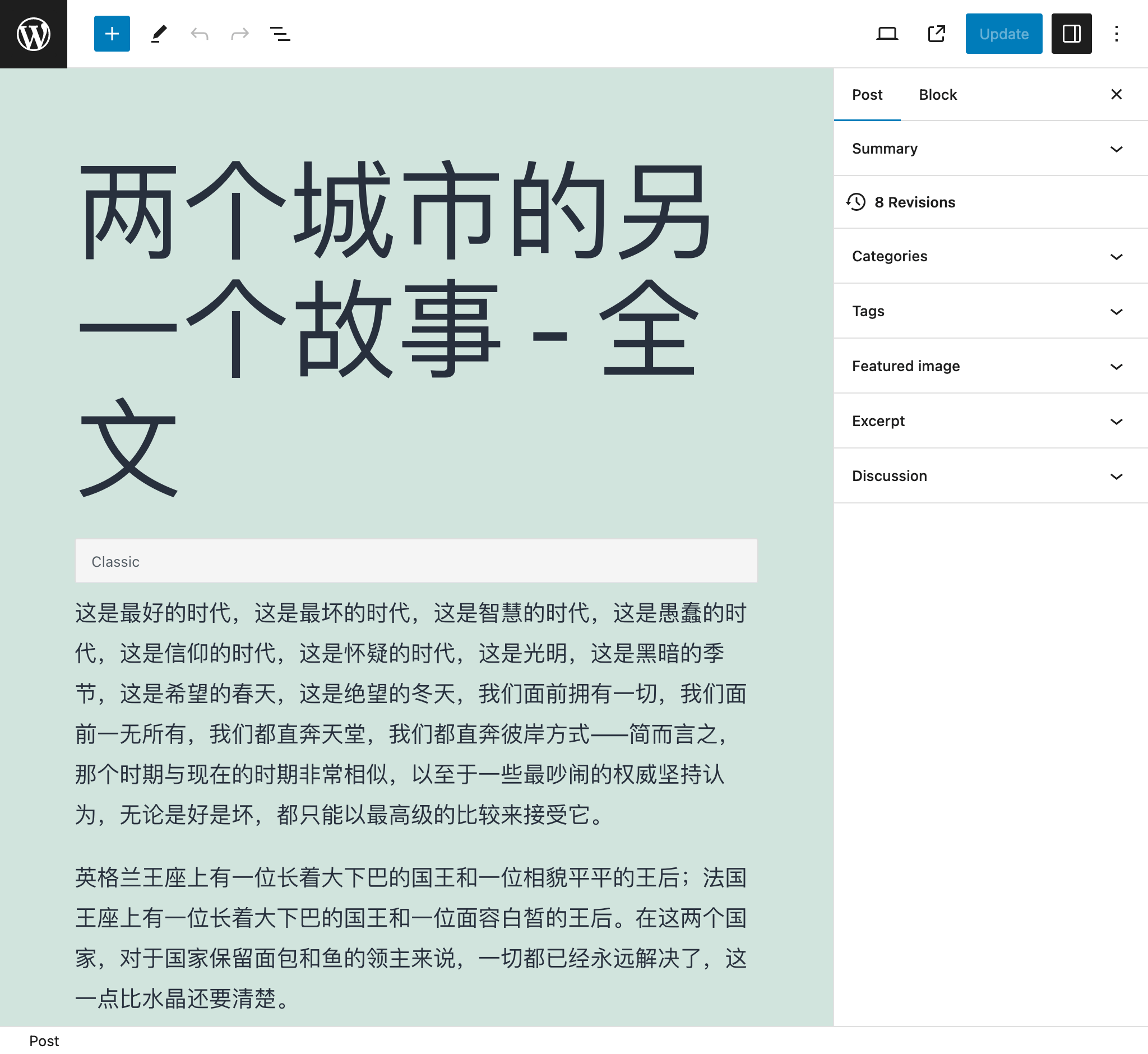
例如,将此文章从英语翻译为中文后:
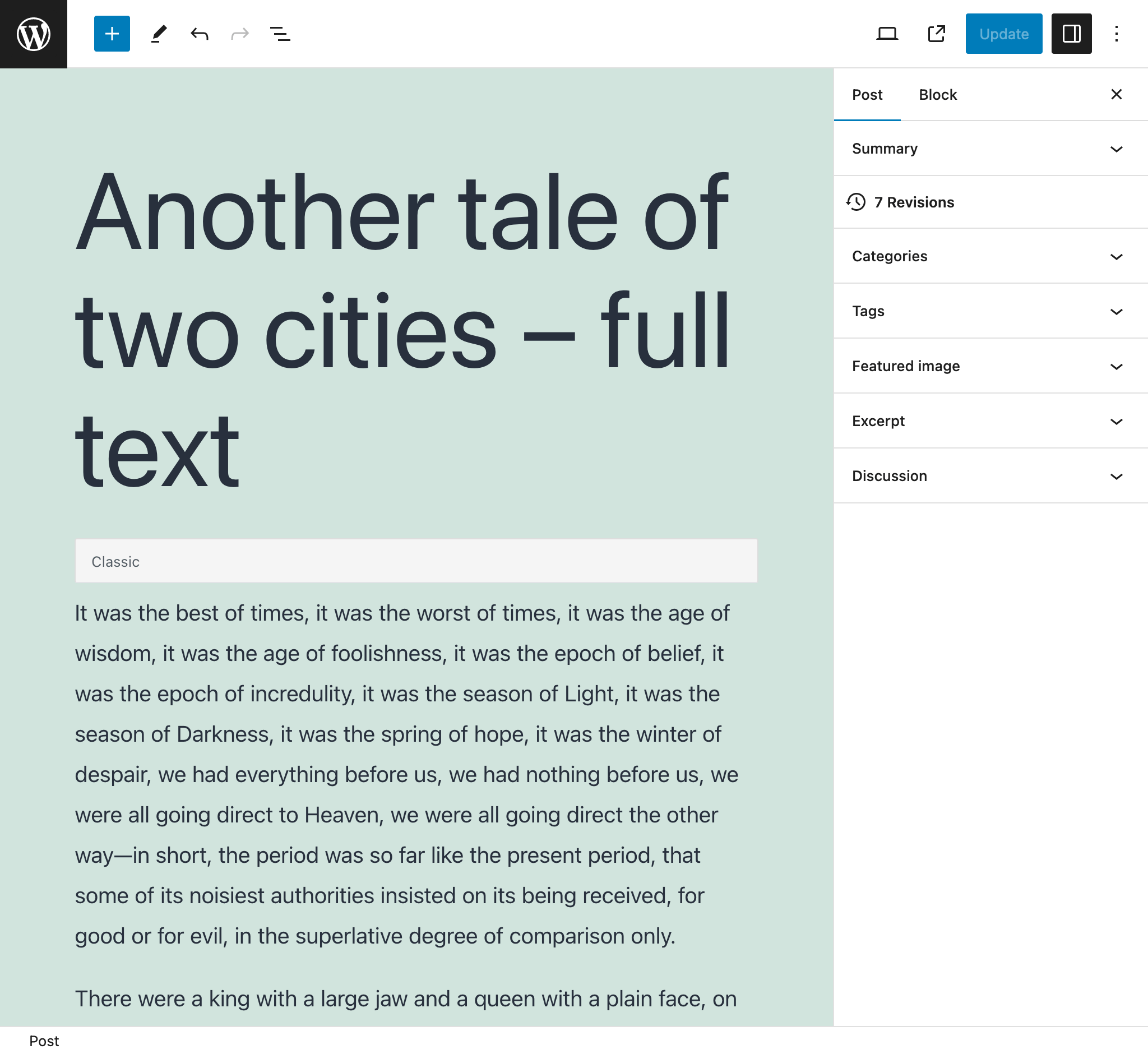
...将变为:
从 WordPress RSS 订阅源导入文章
指向某篇文章的 WordPress RSS 订阅源,即可使用其数据创建新文章。
例如,此 query 将解析以下单篇文章的 RSS 订阅源(通常可通过 https://mysite.com/post-slug/feed/rss/?withoutcomments=1 访问):
<?xml version="1.0" encoding="UTF-8"?>
<rss version="2.0"
xmlns:content="http://purl.org/rss/1.0/modules/content/"
xmlns:wfw="http://wellformedweb.org/CommentAPI/"
xmlns:dc="http://purl.org/dc/elements/1.1/"
xmlns:atom="http://www.w3.org/2005/Atom"
xmlns:sy="http://purl.org/rss/1.0/modules/syndication/"
xmlns:slash="http://purl.org/rss/1.0/modules/slash/"
>
<channel>
<title>A tale of two cities – teaser – PoP API Demo</title>
<atom:link href="https://mysite.com/blogroll/a-tale-of-two-cities-teaser/feed/?withoutcomments=1" rel="self" type="application/rss+xml" />
<link>https://mysite.com</link>
<description>Just another WordPress site</description>
<lastBuildDate>Tue, 20 Jul 2021 23:03:59 +0000</lastBuildDate>
<language>en-US</language>
<sy:updatePeriod>hourly</sy:updatePeriod>
<sy:updateFrequency>1 </sy:updateFrequency>
<generator>https://wordpress.org/?v=6.1.1</generator>
<item>
<title>A tale of two cities – teaser</title>
<link>https://mysite.com/blogroll/a-tale-of-two-cities-teaser/</link>
<comments>https://mysite.com/blogroll/a-tale-of-two-cities-teaser/#comments</guides/query/comments>
<dc:creator>leo</dc:creator>
<pubDate>Mon, 21 Dec 2020 08:24:18 +0000</pubDate>
<category>Blogroll</category>
<category>championship</category>
<category>book</category>
<guid isPermaLink="false">https://mysite.com/?p=1657</guid>
<description></description>
<content:encoded>
<p>It was the best of times, it was the worst of times, it was the age of wisdom, it was the age of foolishness, it was the epoch of belief, it was the epoch of incredulity, it was the season of Light, it was the season of Darkness, it was the spring of hope, it was the winter of despair, we had everything before us, we had nothing before us, we were all going direct to Heaven, we were all going direct the other way—in short, the period was so far like the present period, that some of its noisiest authorities insisted on its being received, for good or for evil, in the superlative degree of comparison only.</p>
</content:encoded>
<wfw:commentRss>https://mysite.com/blogroll/a-tale-of-two-cities-teaser/feed/</wfw:commentRss>
<slash:comments>45</slash:comments>
</item>
</channel>
</rss>从 CSV 导入文章
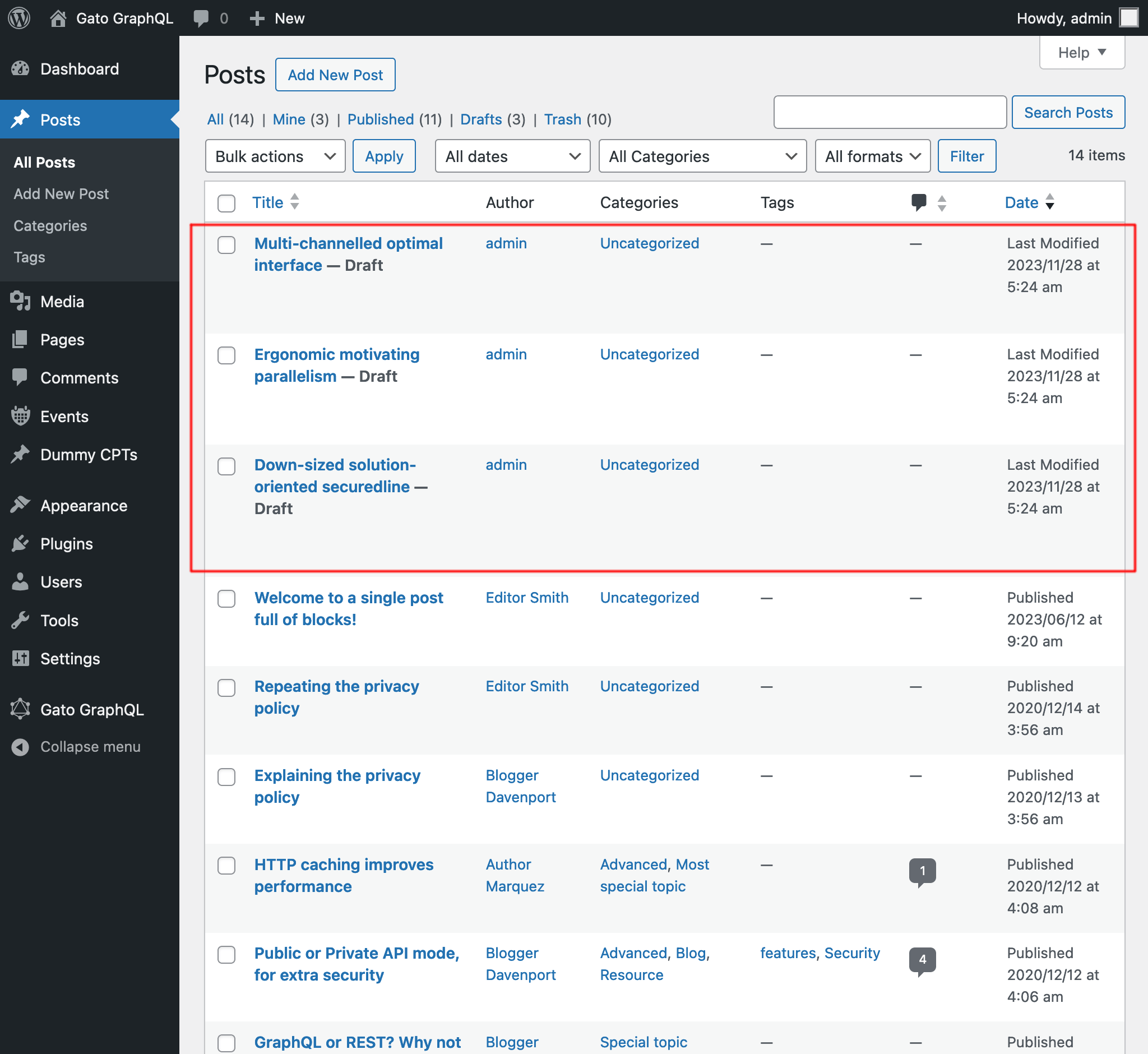
提供一个 CSV 文件,即可按各条目的数据(标题、摘要、正文和作者)创建相应文章。
例如,以下 CSV 将创建 3 篇文章:
Title,Excerpt,Content,Author
Multi-channelled optimal interface,Inventore iste velit et expedita ipsa dolor,"<!-- wp:paragraph -->
<p>Inventore iste velit et expedita ipsa dolor. Optio suscipit qui id harum corporis dignissimos.</p>
<!-- /wp:paragraph -->",admin
Ergonomic motivating parallelism,Consequuntur velit quasi assumenda,"<!-- wp:paragraph -->
<p>Consequuntur velit quasi assumenda. Eum non saepe est. Ut dolorem harum eveniet eaque nemo impedit. Voluptatem commodi modi sed sed animi voluptatem.</p>
<!-- /wp:paragraph -->
<!-- wp:image {""id"":5,""sizeSlug"":""large""} -->
<figure class=""wp-block-image size-large""><img src=""https://mysite.com/wp-content/uploads/2023/09/wordpress0.jpg"" alt="""" class=""wp-image-5""/></figure>
<!-- /wp:image -->
<!-- wp:image {""id"":7,""sizeSlug"":""large""} -->
<figure class=""wp-block-image size-large""><img src=""https://mysite.com/wp-content/uploads/2023/09/wordpress2.jpg"" alt="""" class=""wp-image-7""/></figure>
<!-- /wp:image -->",admin
Down-sized solution-oriented securedline,Ipsam minima qui asperiores dolorum unde voluptas quia voluptate,"<!-- wp:paragraph -->
<p>Ipsam minima qui asperiores dolorum unde voluptas quia voluptate. Incidunt omnis cumque beatae quo deleniti ex. Praesentium nihil et consectetur neque commodi tempora ipsa adipisci. Praesentium perferendis sint est.</p>
<!-- /wp:paragraph -->
<!-- wp:paragraph -->
<p>Et aut fuga aliquam consequuntur dolore sunt ut ut. Quibusdam in voluptas vitae quia eaque. Eligendi dolorum dolorem vitae et vitae et ut.</p>
<!-- /wp:paragraph -->",admin
执行 query 后,将得到以下结果:
获取文章链接
查找所有文章中的所有链接(通过搜索所有 <a href="(...)">(...)</a> 字符串),并以 JSON 对象形式在响应中列出,属性为 { href: (...), text: (...) }。
例如,可能产生以下响应:
{
"data": {
"posts": [
{
"id": 1435,
"title": "Citations from famous authors",
"links": [
{
"href": "https://www.azquotes.com/author/4085-Fyodor_Dostoevsky",
"text": "Quote by Fyodor Dostoevsky"
},
{
"href": "https://www.azquotes.com/author/14706-Leo_Tolstoy",
"text": "Quote by Leon Tolstoi"
},
{
"href": "https://www.azquotes.com/author/15138-Voltaire",
"text": "Quote by Voltaire"
}
]
},
{
"id": 1,
"title": "Hello world!",
"links": []
}
]
}
}新增 XML 标量类型
现在可通过新的 XML 标量类型输入 XML 字符串,该类型将验证 XML 字符串的正确性。
例如,以下 query:
{
_strDecodeXMLAsJSON(xml: """<?xml version="1.0" encoding="UTF-8"?>
<body>
<message>Hello world!</message>
</body>
""")
}...将产生:
{
"data": {
"_strDecodeXMLAsJSON": {
"message": "Hello world!"
}
}
}而以下 query:
{
_strDecodeXMLAsJSON(xml: """<?xml version="1.0" encoding="UTF-8"?>
<body>
<message>Hello world!</message>
""")
}...将产生:
{
"errors": [
{
"message": "Cannot cast value '<?xml version=\"1.0\" encoding=\"UTF-8\"?>\n <body>\n <message>Hello world!<\/message>\n ' for type 'XML'",
"locations": [
{
"line": 2,
"column": 31
}
],
"extensions": {
"field": "_strDecodeXMLAsJSON(xml: \"<?xml version=\"1.0\" encoding=\"UTF-8\"?>\n <body>\n <message>Hello world!<\/message>\n \")",
"problems": [
"Premature end of data in tag body line 2\n"
]
}
}
],
"data": {
"_strDecodeXMLAsJSON": null
}
}文档改进
- 为 Helper Function Collection 扩展的新字段添加了文档:
_strDecodeXMLAsJSON_strParseCSV
修复
- 在预定义 Persisted Queries「Translate post」和「Translate posts」中,选择区块的
attributes.{something}属性时添加了failIfNonExistingKeyOrPath: false(因为该属性有时可能未定义) - 在预定义 Persisted Query「Import post from WordPress site」中,添加了状态
any以选择文章 - 将 Persisted Query「Translate post」重命名为「Translate post (Gutenberg)」,将「Translate posts」重命名为「Translate posts (Gutenberg)」